The data model
Simulated and recorded GRAND data are stored in ROOT TTree objects.
grand.dataio reads and writes them, so that you work with Python
numbers, lists and arrays rather than with ROOT classes.
An event is usually a candidate air shower, generated by a cosmic ray, gamma ray or neutrino. A run is a collection of events detected within a given time span.
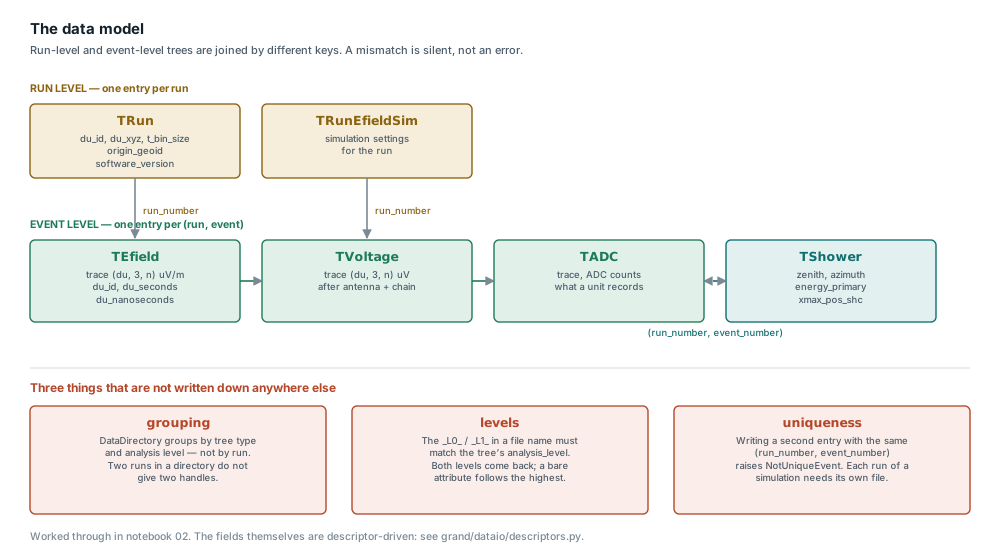
Click the figure to open it full size.
The naming convention
The class names follow four rules:
TRun*Information that stays constant for the duration of a run. One entry per run.
T*(withoutRun)One entry per event.
T*SimContent produced exclusively by simulators.
T*withoutSimContent originating from hardware. It may also be filled by simulation, in which case fields that hardware would have supplied are left empty.
The classes
Class |
Contents |
|---|---|
|
Run information common to all events |
|
Voltage information common to all events of a run |
|
Traces in ADC units, before conversion to voltage |
|
Traces after conversion to voltage |
|
Voltage traces, as simulated by |
|
Electric-field traces of an event |
|
Characteristics of a shower |
|
Additional information about a simulated shower |
|
Noise information common to all events of a run |
Read one event
The shower parameters – zenith, azimuth, energy, Xmax – are in TShower,
in the shower_*.root file. TShowerSim (showersim_*.root) holds
only what a simulator adds on top, so tshowersim.zenith does not exist.
Both forms below print the first event of the sample that ships with the
repository; run them from the repository root.
With grand.dataio, one tree per file:
from grand.dataio import TShower, TEfield

DIR = "sim2root/Common/sim_Xiaodushan_20221026_000000_RUN1_CD_ZHAireS_0000/"

with TShower(DIR + "shower_1618-13790_L0_0000.root") as shower:
    shower.get_entry(0)
    run, event = shower.run_number, shower.event_number
    print("run %d, event %d" % (run, event))
    print("zenith %.2f deg, azimuth %.2f deg" % (shower.zenith, shower.azimuth))
    print("energy %.3g GeV, Xmax %.1f g/cm2" % (shower.energy_primary, shower.xmax_grams))

with TEfield(DIR + "efield_1618-13790_L0_0000.root") as efield:
    efield.get_event(event, run)
    print("antennas %d" % len(efield.du_id))
With grand.aoi, which joins the trees into one event object:
from grand.aoi.event_list import EventList

DIR = "sim2root/Common/sim_Xiaodushan_20221026_000000_RUN1_CD_ZHAireS_0000"

event = next(iter(EventList(DIR)))
shower = event.simshower            # the simulated shower, from the L0 shower file
print("run %d, event %d" % (event.run_number, event.event_number))
print("zenith %.2f deg, azimuth %.2f deg" % (shower.zenith, shower.azimuth))
print("energy %.3g GeV, Xmax %.1f g/cm2" % (shower.energy_primary, shower.Xmax))
print("antennas %d" % len(event.antennas))
The two APIs name the same quantity differently and simshower means
different things in each: in grand.aoi it is the simulated shower
read from TShower at level 0 (event.shower is the level-1 one, absent
from a simulation), not TShowerSim.
Quantity |
|
|
Unit |
|---|---|---|---|
Zenith (“comes from”) |
|
|
degrees |
Azimuth (“comes from”) |
|
|
degrees |
Primary energy |
|
|
GeV |
Electromagnetic energy |
|
|
GeV |
Xmax depth |
|
|
g/cm² |
Xmax position |
|
|
m |
Core position |
|
|
m |
Primary particle (PDG) |
|
|
– |
Antennas in the event |
|
|
– |
Notebook 09, Reading events (Tutorial notebooks), goes further with
grand.aoi: traces, times and the pitfalls of looping over events.
Provenance
TRun carries data_generator_version, event_version,
analysis_level, site and site_layout; every tree records the
software that last wrote it (modification_software,
modification_software_version) and TVoltage the GRANDlib version
that computed its voltages (grandlib_version). A change to the
Galactic-noise normalization, for example, alters every voltage without
changing the file’s layout; the version stamp is what tells two such files
apart.
site and site_layout are free-form strings: they name a site and a
layout but do not point to a versioned description of either.
Reading many files: release each tree
A tree is released, with the ROOT file it opened, when its last reference
goes, unless another live tree reads the same file. Releasing it explicitly
is clearer and takes effect at once rather than at the next garbage
collection. The simplest way is the with form, which releases the tree
even if the loop body raises:
from pathlib import Path
from grand.dataio.event_trees import TADC, TRawVoltage

for path in Path("data").rglob("*.root"):
    with TADC(str(path)) as tadc, TRawVoltage(str(path)) as tvoltage:
        for event, run in tadc.get_list_of_events():
            tadc.get_event(event, run)
            ...
Without with, call stop_using() at the end of each iteration:
tadc = TADC(path)
...
tadc.stop_using()
stop_using() removes the tree from grand_tree_list and closes the ROOT
file the tree opened from a file name, once no other live tree reads from that
file. A ROOT.TFile you passed in yourself, or the one a DataFile
holds, is left open for you to close. Do not use a tree after releasing it: if
its file was closed, the TTree is gone. Write a tree you filled with
write() before releasing it.
Releasing does not bring memory growth to zero: ROOT 6.36 itself keeps about 0.08 MB for every file opened, read and closed, even from compiled C++.
How the tree classes work
A field of a tree class is a descriptor, not an ordinary attribute.
TTreeScalarDesc, StdVectorListDesc and their siblings translate
between Python values and the C++ type of a TTree branch, so declaring
nutrig_rhox: StdVectorListDesc = field(default=StdVectorListDesc("unsigned short"))
adds a branch to the file format. Adding or renaming a field therefore
changes what every reader of the format sees;
tests/dataio/test_schema_snapshot.py fails until the stored snapshot of
the layout is updated, so the change shows up in review.
A descriptor can also carry a unit and a valid range. Writing a value outside the range warns. The unit appears in the field’s documentation.
Reference
Data format reference lists every field of every tree, with its type, unit and meaning. Appendix B of [2] and API reference for every class and field.
Where next
Data format reference for every field of every tree.
Recipes for reading events and many files.
Notebooks 02 and 09 (Tutorial notebooks).