Directory Structure
Warning
This section contains statements the code contradicts. See GRANDlib Handbook for the errata.
The GRANDlib repository is organized into modular directories to facilitate simulation, data access, and detector modeling. Below is an overview of the top-level folders and their purpose.
Directory |
Description |
|---|---|
|
Scripts for downloading essential models (antenna responses, galactic noise maps, electronics chain, geomagnetic files). Required before most simulations. |
|
Documentation PDFs for internal conventions,
coordinate systems, and analysis tutorials. Includes
|
|
Environment setup scripts and conda environment YAML
files. Contains |
|
Example Python and Jupyter notebooks for common workflows, such as plotting traces, computing antenna response, or applying filtering methods. |
|
Core Python package. Implements file I/O
( |
|
Tools for interacting with the GRAND SQL database, currently under development. Includes schema wrappers and utilities. |
|
Code quality and test scripts. Includes formatting, static checks, and test suite configuration. |
|
Executable scripts for E-field to voltage conversion, antenna filtering, and plotting. Standalone tools for CLI usage. |
|
Contains tools and bindings to convert outputs from external simulation software (e.g. AIRES, ZHAireS) into ROOT files readable by GRANDlib. |
Each of these directories contains submodules or utilities covered in later chapters. For first-time users, it is recommended to explore the data/, grand/, and examples/ directories after installation.
Data
The data directory contains mainly scripts that allow the user to download various models, such as the antenna model, electronic effects, and the galactic signal.
download_data_grand.py
This script checks and downloads the GRAND detector data model.
First, remove or rename the directory grand/data/model/detector if it already exists on your system. Then, navigate to the grand/data directory and run:
python download_data_grand.py
Possible outputs include:
==============================
Detector directory does not exist. Triggering data model download.

==============================
Skip download: data model is up to date.

==============================
Updating data model. Removing old directories...
==============================
Downloading new data model ({repo_version}), please wait...
==============================
Extracting tar file...

Data model updated successfully!
download_LFmap_grand.py
This script downloads the LFMap.tar.gz file required for galactic noise simulations. Navigate to the grand/data directory and run:
python download_LFmap_grand.py
Possible outputs:
==============================
Skip download LFmap files for Galactic noise simulations

==============================
Download LFmap model (~ 6.4 MB) for GRAND, please wait ...
==============================
Extracting tar file...

LFmap model available in grand/data/noise directory !
download_grand_antenna_models.py
This script downloads the grand_model_20241218.tar.gz file containing the antenna model files. Run the following in the grand/data directory:
python download_grand_antenna_models.py
Expected outputs:
==============================
Skip download Grand antenna models

==============================
Download antenna models, RFchain, Galactic noise (~ 1GB) for GRAND, please wait ...

Successfully downloaded

==============================
Extracting tar file...

Antenna models available in grand/data/detector directory !
download_new_RFchain.py
This script downloads the RF_chain_20241218.tar.gz file containing the detector and electronic models. In the grand/data directory, run:
python download_new_RFchain.py
Possible outputs:
==============================
Skip download data model

==============================
Download new RFchain model (~ 450 KB) for GRAND, please wait ...

Successfully downloaded

==============================
Extracting tar file...

data model available in grand/data/detector directory !
Geomagnet
This folder includes geomagnetic model files:
IGRF13.COFWMM2020.COF
These files are required for scripts in examples/geo/ that simulate Earth’s magnetic field at different altitudes and locations.
Detector
Light_GP300Antenna_EWarm_leff.npzLight_GP300Antenna_SNarm_leff.npzLight_GP300Antenna_Zarm_leff.npzLight_GP300Antenna_mat_Xarm_leff.npzLight_GP300Antenna_mat_Yarm_leff.npzLight_GP300Antenna_mat_Zarm_leff.npzLight_GP300Antenna_nec_Xarm_leff.npzLight_GP300Antenna_nec_Yarm_leff.npzLight_GP300Antenna_nec_Zarm_leff.npz
File Format
.npz archive, which is a compressed container of multiple arrays. It provides the effective length response of the GP300 antenna model (South–North arm, denoted SN or X arm, East–West arm, denoted EW or Y arm, and the vertical Z arm — corrected here; the PDF has X and Y the other way round, see GRANDlib Handbook) as a function of frequency and arrival direction.Contents
Key |
Shape |
Dtype |
Description |
|---|---|---|---|
|
(1,) |
string |
File format version (e.g.,
|
|
(221,) |
float64 |
Frequency axis in MHz, covering the simulated frequency range. |
|
(361, 91, 221) |
complex128 |
Effective antenna length (\(\theta\)-component), complex values. Indexed as [azimuth, zenith, frequency]. |
|
(361, 91, 221) |
complex128 |
Effective antenna length (\(\phi\)-component), complex values. Indexed as [azimuth, zenith, frequency]. |
Coordinate System and Indexing
Azimuth (:math:`phi`): \(0^\circ\)–\(360^\circ\), sampled in \(1^\circ\) steps (array length = 361).
Zenith (:math:`theta`): \(0^\circ\)–\(90^\circ\), sampled in \(1^\circ\) steps (array length = 91).
Frequency: 221 bins, exact values provided in
freq_mhzfrom 30-250MHz.
Thus, for each frequency bin, the file stores the complex effective length vector of the antenna in spherical coordinates \((\theta, \phi)\).
Example Usage
import numpy as np
import matplotlib.pyplot as plt

# ## Load Data
file_path = "file/path/to/Light_GP300Antenna_EWarm_leff.npz"
data = np.load(file_path)

freq = data["freq_mhz"]        # (221,)
leff_theta = data["leff_theta"]  # (361, 91, 221) [az, zen, freq]
leff_phi   = data["leff_phi"]    # (361, 91, 221)

print("Available keys:", list(data.keys()))
print("freq shape:", freq.shape, "range:", freq.min(), "-", freq.max())
print("leff_theta shape:", leff_theta.shape)
print("leff_phi shape:", leff_phi.shape)

# ## 1. Plot |leff_theta| vs frequency at selected angles
az_samples = [0, 90, 180, 270]   # degrees
zen_samples = [30, 60]           # degrees

plt.figure(figsize=(8,5))
for az in az_samples:
    for zen in zen_samples:
        y = np.abs(leff_theta[az, zen, :])
        plt.plot(freq, y, label=f"az={az}^\circ$, zen={zen}^\circ$")
plt.xlabel("Frequency [MHz]")
plt.ylabel(r"$|l_{\mathrm{eff},\theta}|$ [m]")
plt.title("|leff_theta| vs Frequency")
plt.grid(True)
plt.legend()
plt.show()


# ## 2. Plot |leff_phi| vs frequency at selected angles
plt.figure(figsize=(8,5))
for az in az_samples:
    for zen in zen_samples:
        y = np.abs(leff_phi[az, zen, :])
        plt.plot(freq, y, label=f"az={az}^\circ$, zen={zen}^\circ$")
plt.xlabel("Frequency [MHz]")
plt.ylabel(r"$|l_{\mathrm{eff},\phi}|$ [m]")
plt.title("|leff_phi| vs Frequency")
plt.grid(True)
plt.legend()
plt.show()

# ## 3. Heatmaps at a chosen frequency
f_target = 50.0
f_idx = np.argmin(np.abs(freq - f_target))
f_val = freq[f_idx]

theta_map = np.abs(leff_theta[:, :, f_idx]).T  # shape (zen, az)
phi_map   = np.abs(leff_phi[:, :, f_idx]).T

# Heatmap of leff_theta
plt.figure(figsize=(8,5))
im = plt.imshow(theta_map, origin="lower", aspect="auto",
                extent=[0, 360, 0, 90])
plt.colorbar(im, label=r"$|l_{\mathrm{eff},\theta}|$ [m]")
plt.xlabel("Azimuth [deg]")
plt.ylabel("Zenith [deg]")
plt.title(f"|leff_theta| at {f_val:.1f} MHz")
plt.show()

# Heatmap of leff_phi
plt.figure(figsize=(8,5))
im = plt.imshow(phi_map, origin="lower", aspect="auto",
                extent=[0, 360, 0, 90])
plt.colorbar(im, label=r"$|l_{\mathrm{eff},\phi}|$ [m]")
plt.xlabel("Azimuth [deg]")
plt.ylabel("Zenith [deg]")
plt.title(f"|leff_phi| at {f_val:.1f} MHz")
plt.show()
RFchain_v2: RF Chain Data and Formats
The RFchain_v2 directory contains Touchstone S-parameter files for individual RF components (antenna+LNA frontends, standalone LNAs, baluns, matching networks, filters, cable/connector sections), measured or simulated transfer functions, and helper scripts/notes used to build the station-level RF transfer function.
Folder Contents (overview)
.s1p/.s2p):antenna_LNA_X_frontend0db.s2p, antenna_LNA_Y_frontend0db.s2p, antenna_LNA_Z_frontend0db.s2p, LNA-X.s2p, LNA-Y.s2p, LNA-Z.s2p, balun_before_ad.s2p, balun_in_nut.s2p, MatchingNetworkX.s2p, MatchingNetworkY.s2p, MatchingNetworkZ.s2p, cable+Connector.s2p, feb+amfitler+biast.s2p, filter+vga0db+filter.s2p, filter+vga20db+filter.s2p, High_freq_pass_PAnalogfilter.s2pTF_full_rf_chain2.npy, TF_Vlna_out_rf_chain2.npy, TF2_20241218_EW, TF2_20241218_NS, TF3_20dB_EW, TF3_20dB_NS, TF3_20dB_ZNotes & scripts: rf_chain_new_setup.py, Note.txt, plus a folder Antenna S1p including matching network measured results/ with additional measurements.
Touchstone Format Recap
\[\verb|# <FreqUnit> <ParamType> <Format> R <Z_0>|\]Common options in this folder:
Frequency unit:
HzParameter type:
S(S-parameters)Data format:
DB(magnitude dB, phase deg) orRI(real, imaginary)Reference impedance: typically \(50\,\Omega\)
Data lines for .s2p contain 9 columns: frequency, then the four complex entries \(S_{11}\), \(S_{21}\), \(S_{12}\), \(S_{22}\) (each as a pair depending on the chosen format). For .s1p, 3 columns: frequency and \(S_{11}\) (complex).
Component Files (details)
# Hz S DB R 0. dB/deg S-params across band. Used as combined antenna+LNA frontend model (X).DB or RI, \(R\!=\!50\,\Omega\))..s2p..s2p.# Hz S RI R 50. Real/imag S-params. High-pass (or HF-pass) analog filter response..s1p antenna+matching measurements; same Touchstone conventions.Precomputed Transfer Functions
TF_full_rf_chain2.npy: complex transfer function \(H(f)\) of the full cascaded chain on a frequency grid (NumPy.npy, complex dtype).TF_Vlna_out_rf_chain2.npy: complex transfer function evaluated at the LNA output (NumPy.npy, complex dtype).TF2_20241218_EW,TF2_20241218_NS,TF3_20dB_EW,TF3_20dB_NS,TF3_20dB_Z: text files with one complex value per line (format like(a+bj)), representing \(H(f)\) samples for given hardware states (date-stamped runs and VGA settings).
Helper Script
rf_chain_new_setup.py loads individual .s1p/.s2p blocks, aligns/interpolates them onto a common frequency grid, performs the cascade, and can export \(H(f)\) as .npy or text. It is the reference for reproducing TF_* arrays in this folder.Notes
Note.txt contains measurement context (e.g. “measured by 50 Ohm VNA”), reaffirming the \(50\,\Omega\) reference used during VNA measurements.Noise
The noise/ directory provides simulated and measured background noise models used in GRAND simulations. These files describe the expected galactic and instrumental noise in different formats, ready for direct use in Python.
Contents Overview
Voltage-domain noise models:
Vocmax_*,Voutmax_*arrays (units: \(\mu\)V/MHz).Power-domain noise models:
Pocmax_*arrays (units: Watt/MHz or dBm/MHz).Galactic sky maps: LFmap-based noise simulations stored as
LFmap/*.npy.MATLAB format file:
PG_ALL_jifen.mat(original measurement set).
File Types
Usage in Simulations
Open-circuit noise (\(Voc\)) is scaled by the antenna effective length and impedance.
Output noise (\(Vout\)) is after RF chain filtering and amplification.
LFmap sky maps provide directional dependence of galactic noise.
Topography
The topography/ directory contains Shuttle Radar Topography Mission (SRTM) digital elevation tiles in .hgt format. These are used by GRANDlib’s grand.topography module to provide realistic ground profiles for antenna placement, shower footprint projection, and propagation studies.
File Format
Each
.hgtfile corresponds to a 1°×1° tile of Earth’s surface.Filename convention:
NxxEyyy.hgt(or S/W for south/west), wherexx= latitude andyyy= longitude of the southwest corner.Data type: signed 16-bit integers (big-endian).
Resolution: typically 3 arc-seconds (\(\approx\)90 m) or 1 arc-second (\(\approx\)30 m), depending on dataset version.
Elevation unit: meters above sea level.
Files in this folder
Usage
grand.topography module reads .hgt files and interpolates elevations into local tangent plane (LTP) coordinates. These are then used for:Generating realistic antenna positions on terrain.
Calculating line-of-sight and horizon limits for signal propagation.
Projecting air shower footprints onto irregular ground surfaces.
Docs
The docs/ directory contains documentation files that describe the GRAND coordinate conventions, class structures, and interactive tutorials. These files are particularly useful for understanding the data formats and signal analysis workflow used in GRANDlib.
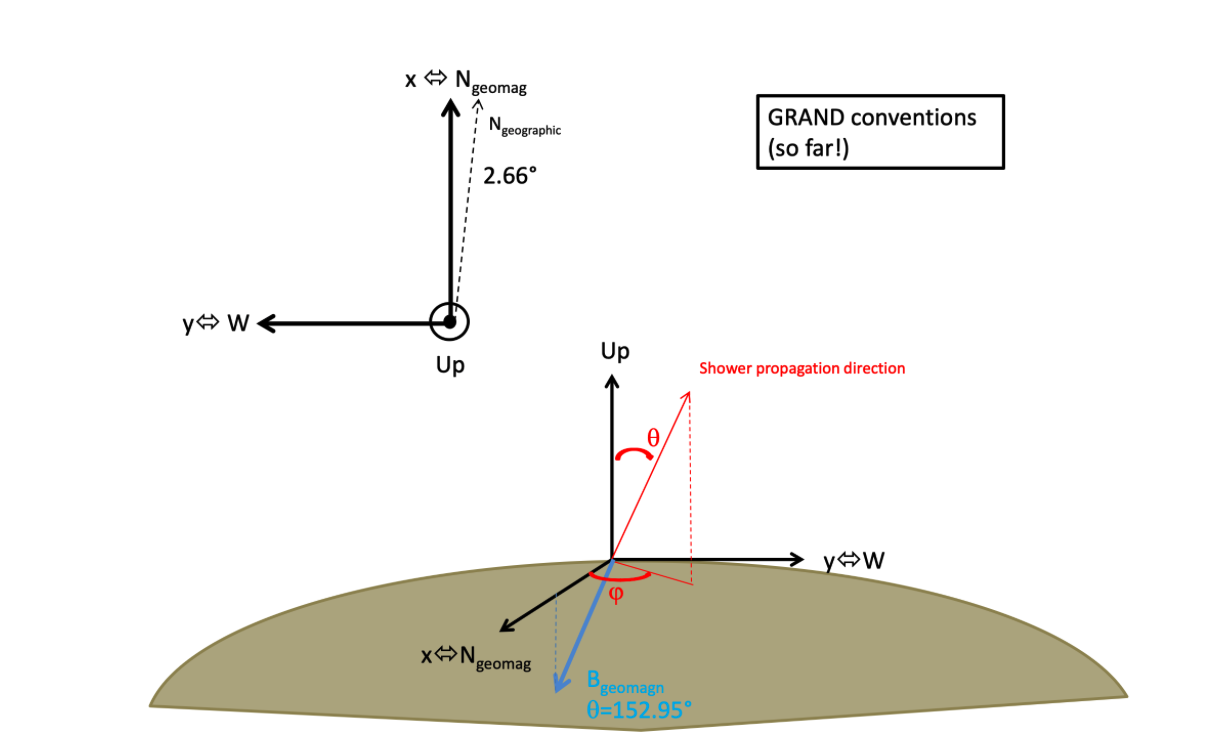
GRANDreferential.pdf
This document defines the GRAND coordinate system conventions.
GRANDscripts.pdf
This is a hands-on tutorial PDF designed for newcomers. It includes:
Step-by-step instructions for computing antenna response to transient EM signals
Exploration of time traces and amplitude patterns
Exercises using real or simulated events
It is split into two parts:
Computing the antenna response to a transient signal
Analyzing the signal at the output of the RF chain
grandlib_classes_v2.pdf
This file documents the internal Python classes and conventions used by GRANDlib, including:
Antenna model format and frequency response structures
3D time trace structures (E-field and V-field)
Detector and hardware model naming conventions
This document is especially useful for developers extending or modifying GRANDlib’s internal components.
Package/
The docs/package/ directory contains reStructuredText (.rst) source files used to generate developer documentation for GRANDlib via the Sphinx toolchain. These files document the structure and interfaces of key GRANDlib modules.
Included files:
grand.rst— Top-level namespace overviewgrand.io.rst— ROOT file input/output documentationgrand.topography.rst— Coordinate and elevation functionsgrand.coordinates.rst— Details on coordinate systems usedgrand.simulation.rst— Shower simulation bindingsgrand.store.rst— Metadata and storage format helpersgrand.geomagnet.rst— Geomagnetic field modeling tools
These files are meant to be compiled using the sphinx-build command or included in an auto-generated API index. They rely on docstrings and module introspection to produce clean, browsable HTML or PDF documentation for developers.
Env
The env/ directory contains configuration scripts and helper tools for initializing GRANDlib in either Docker or Conda environments. These scripts ensure all environment variables are correctly set, dependencies are compiled, and optional tools (e.g., VS Code setup) are ready.
setup.sh
Main initialization script. It:
Sets
GRAND_ROOTAdds
grand/,scripts/, andquality/toPYTHONPATHandPATHCompiles TURTLE and GULL (C/C++ dependencies)
Optionally downloads the detector model
Execute with:
source env/setup.sh
Expected output:
Set var GRAND_ROOT=/home/user/grand
==============================
add grand/quality to PATH
add scripts to PATH
add grand to PYTHONPATH
Install external lib gull and turtle
make: Nothing to be done for 'all'.
==============================
Download data model (~452MB) for GRAND, please wait ...
_setup_env.sh
This internal script is sourced by setup.sh. It handles the actual setting of paths and environment variables:
Exports library paths (e.g., GULL, TURTLE)
Updates
LD_LIBRARY_PATH,PYTHONPATH, andPATHEnsures all submodules are accessible
_setup_lib.sh
This helper script builds TURTLE and GULL using make. It:
Detects architecture and compiler settings
Ensures a clean build if needed
Verifies that required static libraries are created
If compilation fails:
cd src
make clean
cd ..
source env/setup.sh
_setup_vs_code.py
Optional helper script to configure VS Code development environment. It:
Generates VS Code settings files
Adds the correct interpreter path
Enables linting and auto-completion for GRANDlib modules
readme.md (env/)
A short README explaining the differences between Docker (recommended on macOS) and Conda (preferred on Linux). It links to the GRANDlib wiki and provides local Conda environment instructions.
Conda Files
The env/conda/ folder contains ready-to-use files and setup instructions to manage Conda environments compatible with GRANDlib.
grandlib_amd64.yml
The recommended YAML file for setting up GRANDlib on amd64 (x86_64) systems.
To use:
conda config --set channel_priority disabled
conda env create -n grandlib --file env/conda/grandlib_amd64.yml
conda activate grandlib
It includes:
ROOT (6.30.4), GCC/GFortran
matplotlib,scipy,awkward,h5pyastropy,uproot,lmfit,paramiko,plotly
Also includes a list of Python packages under pip for signal processing and testing.
requirements.txt
Minimal set of Python dependencies for editable installation:
pip install -r env/conda/requirements.txt
Includes:
matplotlib,lmfit,pytest,astropy,uprootOthers are commented for manual tuning (e.g.,
scipy,numba)
readme.md (conda/)
Describes:
Conda/pip installation
Manual environment setup (e.g., TURTLE, GULL variables)
How to export custom Conda envs into YAML
Example:
conda create -c conda-forge --name grandlib_root_6.30 root=6.30.4
conda activate grandlib_root_6.30
conda env export > grandlib_root_6.30.yml
# Edit and expand YAML
conda env create -n grandlib_root_6.30_complete --file grandlib_root_6.30.yml
Docker ARM64
The env/docker/ directory includes Dockerfiles and build scripts for Apple Silicon (M1/M2) and other ARM64 platforms.
Dockerfiles
base.dockerfile— Fedora basedev.dockerfile— Full development imagerelease.dockerfile— Lightweight runtime imageci.dockerfile— Headless CI imagedev_eclipse.dockerfile— Dev image with Eclipse
Build Scripts
build_base.shbuild_dev.shbuild_release.shbuild_ci.shbuild_dev_eclipse.sh
Example Build (ARM64)
git clone https://github.com/grand-mother/grand.git
cd grand/env/docker
bash build_dev.sh
docker run -it --rm -v $PWD:/home grandlib/dev:2.0
Tagging Custom Images
docker commit grand-arm64
docker tag <container-id> grandlib/dev:custom
docker save -o grandlib-dev-custom.tar grandlib/dev:custom
Docker AMD64 (Intel/AMD)
Instructions for running GRANDlib on x86_64 systems via Docker.
Dockerfiles
Same as ARM64: base.dockerfile, dev.dockerfile, etc.
Build and Run
cd env/docker
bash build_dev.sh

docker run -it --rm -v $PWD:/home grandlib/dev:1.2
GUI Support (Linux)
Option 1:
docker run --net=host \
  --env="DISPLAY" \
  --volume="$HOME/.Xauthority:/root/.Xauthority:rw" \
  --name grand_dev_gui grandlib/dev:1.2
Option 2:
xhost +
docker run -it --rm \
  -e DISPLAY=$DISPLAY \
  -v /tmp/.X11-unix:/tmp/.X11-unix \
  grandlib/dev:1.2
xhost -
Eclipse Image
Includes Eclipse IDE 4.22 with:
EGit, PyDev
YAML, Bash editors
See note_install_eclipse.md for more.
DockerHub Publishing
docker login -u grandlib
docker tag grandlib/dev:custom grandlib/dev:1.0
docker push grandlib/dev:1.0
docker save -o grandlib-dev.tar grandlib/dev:1.0
Python Dependencies (Docker)
requirements.txt lists the Python packages the image needs, without
versions, and is what base.dockerfile installs.
A second file, requirements_vers.txt, used to sit beside it holding the
same list pinned to the versions current in 2022, and this page told you to
install it. It was removed on 2026-09-08. Nothing built it — the Dockerfiles
have always installed the unpinned list — and it had not been updated since
February 2023, so following that instruction installed a four-year-old
environment, including a Pillow with a critical advisory against it. It
was invisible to Dependabot, which does not scan that file name, so nothing
would have told you.
If you want a reproducible environment, use the conda one rather than pinning this list by hand:
conda env create -f env/conda/grand-dev.yml --solver=libmamba
conda activate grand-dev
source env/setup.sh
Examples
The examples/ directory provides a collection of Jupyter Notebooks and Python scripts that demonstrate how to use the GRANDlib modules in real-world workflows. These examples are structured by functionality and are ideal for both learning and testing specific components of the GRAND software.
The directory is organized into the following subfolders:
aoi/ — Analysis-Oriented-Interface examples.
basis/ — Basic examples of signal visualization and trace handling.
dataio/ — Reading and manipulating GRANDROOT files directly.
datalib/ — Accessing simulation metadata, antenna configurations, and noise models.
geo/ — Coordinate systems, topography interpolation, and antenna positioning.
sim/ — Simulating events and writing output to GRANDROOT format.
Each subdirectory contains Python scripts or Jupyter Notebooks designed for a specific use case, from basic data browsing to full detector simulation pipelines. The examples are independent and can be run individually once the environment is properly configured using Docker or Conda. Outputs typically include printed event summaries, graphical displays of traces or antenna positions, and written ROOT files when needed.
AOI: Analysis Oriented Interface
The Analysis Oriented Interface (AOI) provides tools for single-event-based analysis workflows, such as reconstruction of \(X_{\text{max}}\), energy, and arrival direction. It is ideal for scenarios where computational time is dominated by analysis rather than I/O.
Generating Dummy Events
python event_generation.py <file_name>
Example output:
Writing events to file dummy_example_events.root
Event  0
No valid tshower TTree in the file dummy_example_events.root. Creating a new one.
No valid tefield TTree in the file dummy_example_events.root. Creating a new one.
No valid tvoltage TTree in the file dummy_example_events.root. Creating a new one.
No valid trun TTree in the file dummy_example_events.root. Creating a new one.
Wrote event 0
Event  1
Wrote event 1
...
Reading and Inspecting Events
data_play.py or the Jupyter notebook data_play.ipynb.python data_play.py dummy_example_events.root
Example output:
Run information loaded.
Voltage information loaded.
Efield information loaded.
Shower information loaded.
Simulated shower information loaded.
/home/grand/aoi/event.py:878: VisibleDeprecationWarning: Creating an ndarray from ragged nested sequences (which is a list-or-tuple of lists-or-tuples-or ndarrays with different lengths or shapes) is deprecated. If you meant to do this, you must specify 'dtype=object' when creating the ndarray.
  t_vectors = np.array(t_vectors)
_file                          Name: dummy_example_events.root Title:
_directory                                               None
event_number                                                0
run_number                                                  0
_entry_number                                            None
L                                                           0
t_vector                       [0.000e+00 1.000e+00 2.000e+00 ... 1.878e+03 1.879e+03 1.880e+03]
is_reconstructed                                        False
is_wave                                                 False
origin_planewave                                   [0. 0. 0.]
chi2_planewave                                     [0. 0. 0.]
origin_sphere                                      [0. 0. 0.]
chi2_sphere                                        [0. 0. 0.]
is_eas                                                  False
run_mode                                                    0
data_source                                             other
data_generator                                       GRANDlib
data_generator_version                                  0.1.0
site                                               dummy site
_origin_geoid                              [[0.]
 [0.]
 [0.]]
_t_bin_size                                               2.0
is_starshape                                            False
auto_file_close                                          True
Shower:
        Energy EM:                                                0.0
        Xmax [g/cm2]:                              289.29998779296875
        Xmax position:                                     [0. 0. 0.]
        Origin geoid:                                      [0. 0. 0.]
        Core ground pos:               [ 26.31477737 484.98400879 233.21377563]
Antennas:
        No of antennas:                                             0
        Position:                                                  []
        Tilt:                                                      []
        Acceleration:                                              []
Voltages:
        Triggered status:              [True, True, True, True, True, True]
        Traces lengths:                [927, 941, 934, 930, 911, 924]
        Traces first values:           [0.20999999344348907, 0.38999998569488525, 0.17000000178813934, 1.850000023841858, 0.5099999904632568, -1.7599999904632568]
Efields:
        Traces lengths:                [927, 941, 934, 930, 911, 924]
        Traces first values:           [0.24570000171661377, 0.4562999904155731, 0.1988999992609024, 2.1644999980926514, 0.5967000126838684, -2.0592000484466553]
other
0 [ 0.20999999 -1.74000001 -1.08000004]
1 [ 0.38999999  1.51999998 -0.12      ]
2 [ 0.17       -0.92000002 -1.20000005]
3 [1.85000002 1.13999999 0.63999999]
4 [ 0.50999999 -0.44999999 -0.68000001]
5 [-1.75999999 -1.25999999  0.36000001]
0 [ 0.2457     -2.03579998 -1.26359999]
1 [ 0.45629999  1.77839994 -0.14040001]
2 [ 0.1989     -1.07640004 -1.40400004]
3 [2.1645     1.33379996 0.74879998]
4 [ 0.59670001 -0.52649999 -0.7956    ]
5 [-2.05920005 -1.47420001  0.42120001]
Browsing Real Events (GP300)
python browse_gp13_events_example.py /path/to/gp13_rootfiles/
Example output:
Reading file GRAND.TEST-RAW.20230307174423.001.root
Event 0, du_id 30017, time 2023-03-07 17:44:23.128764
enter "c" or "q" to continue, "x" to quit, "b" to break the loop: c
Event 1, du_id 30042, time 2023-03-07 17:44:23.129016
enter "c" or "q" to continue, "x" to quit, "b" to break the loop: c
Event 2, du_id 30005, time 2023-03-07 17:44:23.129241
enter "c" or "q" to continue, "x" to quit, "b" to break the loop: c
...
Browsing Simulated Events
sim2root.python browse_sim2root_events_example.py /path/to/sim2root_output/
Example output:
Reading directory /data/sim2root/evt_run_000123
Event 0, du_id 41007, time 2023-03-07 18:12:00.003981
enter "c" or "q" to continue, "x" to quit, "b" to break the loop: c
Event 1, du_id 41032, time 2023-03-07 18:12:00.004217
enter "c" or "q" to continue, "x" to quit, "b" to break the loop: c
Event 2, du_id 41019, time 2023-03-07 18:12:00.004429
enter "c" or "q" to continue, "x" to quit, "b" to break the loop: c
...
Basis: Minimal Analysis Pipeline
The basis folder contains a minimal analysis pipeline built on top of the GRANDlib infrastructure. It is ideal for new users seeking a clean and reproducible entry point into GRANDlib-based analysis.
The script ``run_pipeline.py`` is non-functional and has moved to ``examples/old/stubs/`` (#218). For E-field to Voltage conversion, refer to ``scripts/convert_efield2voltage.py``.
class_Handling3dTraces.ipynb:(at dev_sim2root_merge_merge_with_dev)
This Jupyter Notebook demonstrates how to read and visualize 3D traces from GRANDROOT files using the grand.io module.
It is intended as a learning tool for handling Detector Unit (DU) time–domain data and applying simple processing steps.
Key features:
Loading ROOT files and listing available TTrees.
Selecting events, DUs, and channels for inspection.
Plotting voltage traces in the time domain.
Basic filtering and normalization.
Note: This notebook is designed for minimal preprocessing; for E-field to voltage conversion or full simulation pipelines, see scripts/convert_efield2voltage.py or the sim/ examples.
Dataio: Reading and Writing ROOT Files
The dataio folder provides examples for storing and reading simulation data using GRANDlib’s I/O framework.
It interfaces with ROOT TTrees and abstracts low-level ROOT handling into simple Python scripts.
Storing Data to ROOT
This script generates a small dataset of simulated events and stores them into ROOT TTrees.
python data_storing.py </path/to/file>
Example output:
4 traces for event 0
3 traces for event 1
5 traces for event 2
3 traces for event 3
4 traces for event 4
6 traces for event 5
3 traces for event 6
3 traces for event 7
6 traces for event 8
6 traces for event 9
Wrote trun
Wrote tadccounts
Wrote trawvoltage
Wrote tvoltage
Wrote tefield
Wrote tshower
Finished writing file stored_data.root
Reading Data from ROOT
This script reads a ROOT file and reports basic metadata and field values.
python data_reading.py </path/to/file>
Example output:
List of events in the tree:
event_number run_number
0 0
1 0
2 0
...
ADCCounts first event readout: tadccounts.event_number, tadccounts.time_seconds, tadccounts.trace_ch0[0]
0 1754922694 [[ 18 -19  -3 ...  -1   2  16]
 [  8 -11 -19 ...   2   8   5]
 [ 14  -3 -17 ... -12 -16  12]
 [-11   7   8 ... -15 -14  19]]
[ 18 -19  -3 ...   16]
Iterate through ADCCounts
Entry #, Event #, Run #
0 0 0
1 1 0
...

Efield readout: tefield.event_number, tefield.det_time[0], tefield.trace[0][0], tadccounts.evt_id
The event_number of tadccounts changed to 4 when tefield event with event_number 4 was requested
8 1754922695 [-0.0025708  -0.00012854  0.00051416  0.0019281  -0.00038562  0.00154248
 ...]
Using the ROOT Interface Directly
This script shows how to use GRANDlib’s ROOT interface for direct file operations.
python datafile_use.py stored_data.root
Example output:
This DataFile refers to the following file:
['stored_data.root']
File size:                                   812784
Tree classes found in the file: ['TRun', 'TADC', 'TRawVoltage', 'TVoltage', 'TEfield', 'TShower']
Trees of type TRun                                    : ['trun']
Trees of type TADC                                    : ['tadc']
Trees of type TRawVoltage                             : ['trawvoltage']
Trees of type TVoltage                                : ['tvoltage']
Trees of type TEfield                                 : ['tefield']
Trees of type TShower                                 : ['tshower']
trun
  evt_cnt             : 1
  name                : trun
  type                : TRun
  comment             : Generated by data_storing.py
  creation_datetime   : 2025-08-11 14:31:34
  modification_history:
  modification_software:
  modification_software_version:
  analysis_level      : 0
  source_datetime     : 0
  mem_size            : 16007
  disk_size           : 4855
tadc
  evt_cnt             : 10
  name                : tadc
  type                : TADC
  comment             : Generated data_storing.py
  creation_datetime   : 2025-08-11 14:31:34
  modification_history:
  modification_software:
  modification_software_version:
  analysis_level      : 0
  source_datetime     : 0
  dus                 : [0, 1, 2, 3, 4, 5]
  mem_size            : 416245
  disk_size           : 190024
trawvoltage
  evt_cnt             : 10
  name                : trawvoltage
  type                : TRawVoltage
  comment             : Generated data_storing.py
  creation_datetime   : 2025-08-11 14:31:34
  modification_history:
  modification_software:
  modification_software_version:
  analysis_level      : 0
  source_datetime     : 0
  dus                 : [0, 1, 2, 3, 4, 5]
  mem_size            : 681227
  disk_size           : 227889
tvoltage
  evt_cnt             : 10
  name                : tvoltage
  type                : TVoltage
  comment             : Generated data_storing.py
  creation_datetime   : 2025-08-11 14:31:35
  modification_history:
  modification_software:
  modification_software_version:
  analysis_level      : 0
  source_datetime     : 0
  dus                 : [0, 1, 2, 3, 4, 5]
  mem_size            : 503283
  disk_size           : 169492
tefield
  evt_cnt             : 5
  name                : tefield
  type                : TEfield
  comment             : Generated data_storing.py
  creation_datetime   : 2025-08-11 14:31:35
  modification_history:
  modification_software:
  modification_software_version:
  analysis_level      : 0
  source_datetime     : 0
  dus                 : [0, 1, 2, 3, 4, 5]
  mem_size            : 761648
  disk_size           : 204789
tshower
  evt_cnt             : 5
  name                : tshower
  type                : TShower
  comment             : Generated data_storing.py
  creation_datetime   : 2025-08-11 14:31:35
  modification_history:
  modification_software:
  modification_software_version:
  analysis_level      : 0
  source_datetime     : 0
  mem_size            : 12661
  disk_size           : 4253

Read run number 0, event number 0 of tvoltage
Trace X for du 0 for tvoltage:
[ 0.00186768 -0.00219727 -0.00043945  0.00142822  0.0020874   0.0012085
... ]
Accessing 3D Traces
This script loads 3D electric field traces (X, Y, Z components) from a ROOT file.
python ioroot_3dtraces.py /path/to/file.root

options:
  -h, --help            show this help message and exit
  -f, --footprint       interactive plot (double click) of footprint, max value for each DU
  --time_val            interactive plot, value of each DU at time t defined by a slider
  -t TRACE, --trace TRACE
                        plot trace x,y,z and power spectrum of detector unit (DU)
  --idx_evt IDX_EVT     Select event with index <idx_evt>, given by -i option, idx_evt is always > 0 or = 0
  --trace_image         interactive image plot (double click) of norm of traces
  --list_du             list of identifier of DU
  --list_ttree          list of TTree present in file
  --dump DUMP           dump trace of DU
  -i, --info            some information about the contents of the file
Example output:
INFO: Example script to deal with 3D traces.
Nb events     : 12
Idx    run_nb  event_nb
0      174423  1
1      174423  2
...
Select event index: 0
===================
Nb DU         : 64
Size trace    : 2048
Identifier DU : {30001: 0, 30002: 1, 30003: 2, ...}
# (matplotlib windows open for requested plots)
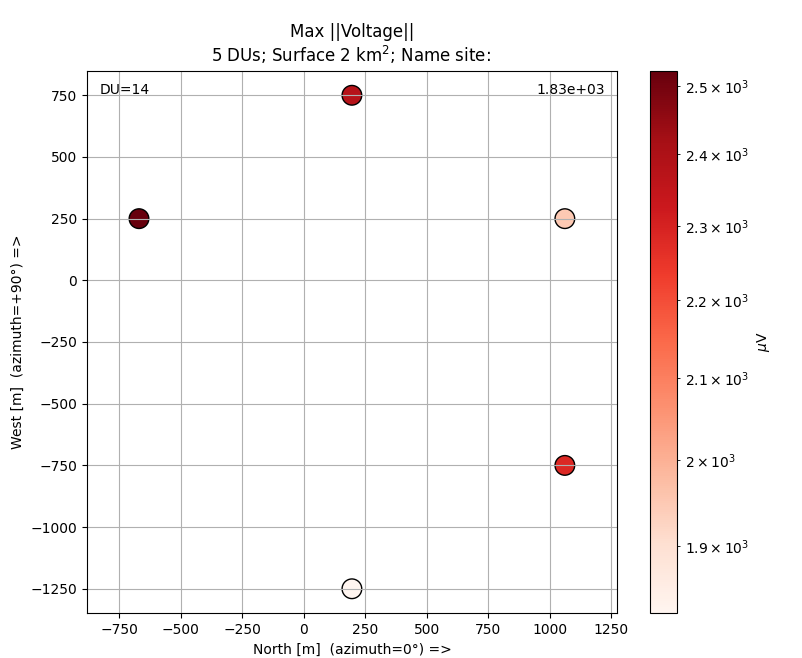
Plot examples with option ``–footprint``
Footprint plot with maximum by detector.
Interactive plot, you can click on DU station to open the trace on each axis and also the density power spectrum associated
Surface of network
Number of detector unit
Axis North, West indicated
Maximum value for each DU
Name file ROOT, event number and run number value
For simulated event:
Distance to core position
Azimuth and zenith angle
Primary energy
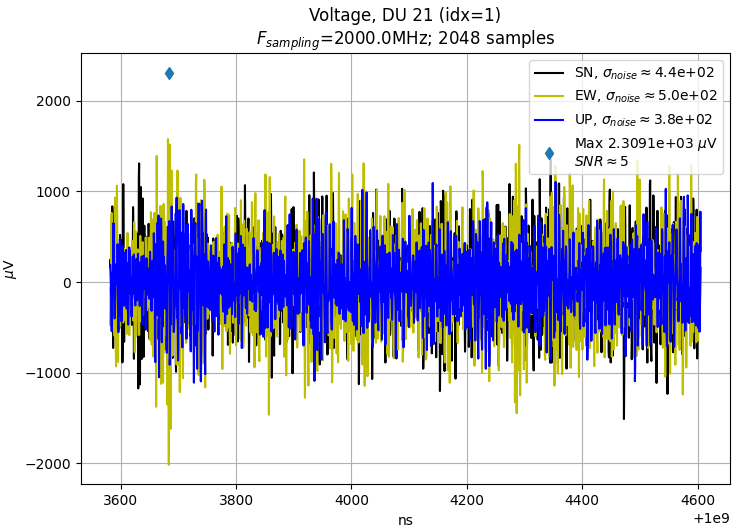
Trace of detector
DU identifier and index value
Frequency sampling
Number of samples
Unit and relative time in event
Estimated noise by antenna
Maximum value by Hilbert estimator with 3 antennas
Estimated SNR
Name file ROOT, event number and run number
Datalib: Data Management and Configuration
The datalib folder provides configuration and a minimal example for structured access to simulation datasets via the granddb data manager. It resolves local files first, then falls back to configured remote repositories (HTTPS or SSH).
Files
config.ini— Declares local directories, remote repositories, and (optionally) credentials.datamanager_example.py— Minimal example showing how to request a file and let the manager fetch it if missing.
Requirements
Python 3.9+ and the repo root on
PYTHONPATH(or installed):export PYTHONPATH=$PWD:$PYTHONPATH
Python packages:
python3 -m pip install requests paramiko sshtunnel "SQLAlchemy>=1.4,<2.0" psycopg2-binary
Sample: config.ini
Notes: (i) localdir must be an absolute path and must already exist; (ii) for SSH, use an agent-loaded key or fill the credentials section.
[general]
provider = "Fleg"

[directories]

Absolute "incoming" directory where fetched files are stored
localdir = ["/home/examples/datalib/incoming"]
[repositories]

SSH repository (path list can include multiple roots)
CC = ["ssh", "cca.in2p3.fr", 22, ["/sps/trend/..."]]
HTTPS repository (e.g., GitHub raw or release storage)
WEB = ["https","github.com", 443, ["/grand-mother/data_challenge1/..."]]
[credentials]

Empty password means: use SSH agent or key-based auth
CC = ["legrand",""]
Setup and Run
Create the incoming folder and run the example from the directory containing both files:
mkdir -p /home/examples/datalib/incoming
python3 datamanager_example.py --config config.ini
What the Example Does
Checks
localdirfor the requested file; if missing, tries the repositories in order.For
WEB(HTTPS) it usesrequests; forCC(SSH) it usesparamiko/sshtunnel.On success, prints the local path to the fetched file (stored under
localdir).
Geo: Geospatial and Topographic Utilities
The geo folder includes tools and tutorials for handling geospatial data, coordinate transformations, geomagnetic fields, and topographic modeling for GRAND site layouts. These tools are essential for simulation configuration, antenna placement, and physical modeling over real terrain.
Key Functionalities:
Coordinate conversions (geodetic \(\leftrightarrow\) local cartesian)
Terrain extraction and interpolation from elevation maps
Magnetic field vector computation using IGRF
Layout generation (hexagonal, rectangular)
Coordinate Transformation
astropy and supports seamless conversion between multiple systems.The following coordinate systems are defined:
ECEF — Earth-Centered Earth-Fixed coordinates.
Geodetic — Latitude, longitude, altitude reference.
LTP — Local Tangent Plane coordinates.
GRANDCS — GRAND-specific system (subclass of LTP).
Defining a coordinate in a required system is done by instantiating the respective CS object.
Magnetic Field Calculation
Using the ’geomagnetic’ module, the magnetic field can be defined in two different ways depending on the input location. The default geomagnetic model (’IGRF13’) and default obstime (’2020-01-01’) are used if not given.
Topography Mapping
Using GP100_topography.py and topography_tutorial.ipynb, you can download DEM tiles and create elevation maps for a given region:
from grand.topography import Topography

topo = Topography("GP100")
topo.plot()
alt = topo.get_altitude(lon=91.98, lat=38.89)
python GP100_topography.py
Example output:
topography: N 40 E 94 N40E094.SRTMGL1.hgt
Caching data for /home/data/topography/N40E094.hgt
Nb of units: 96
A<index> <x_m> <y_m> <latitude_deg> <longitude_deg> <z_m>
 A0 -2120.0 -4488.0 40.883041 94.107676 1401.9
 A1 -706.7 -4488.0 40.895765 94.107760 1371.5
 A2 706.7 -4488.0 40.908489 94.107844 1344.2
 A3 2120.0 -4488.0 40.921213 94.107928 1322.5
 A4 -2826.7 -4080.0 40.876697 94.102795 1419.8
 A5 -1413.4 -4080.0 40.889421 94.102878 1383.4
 A6 -0.0 -4080.0 40.902145 94.102961 1356.1
 A7 1413.4 -4080.0 40.914870 94.103044 1329.5
 A8 2826.7 -4080.0 40.927594 94.103128 1311.3
 ...
Custom Grid Layouts
grids.py— Generates rectangular and polar grids for arrays.hexy.py— Computes hexagonal arrays with adjustable spacing and origin.
These are useful for creating synthetic array layouts for simulation inputs or for deployment planning.
Layout File: GP300 Test Site
The file trial_GP300_layout_2021.txt contains the lat/lon/alt layout of antennas used in the GP300 test configuration. These layouts can be loaded and visualized with ‘grand.detector‘ or ‘grand.topography‘.
Sim: Simulation Examples
The grand/examples/sim directory contains notebooks and scripts that demonstrate key steps of the GRANDlib simulation pipeline: loading antenna models, reading E-field simulations (CoREAS/ZHAireS), converting E-field to voltages through the RF chain, exploring Galactic noise, and plotting voltages at device outputs.
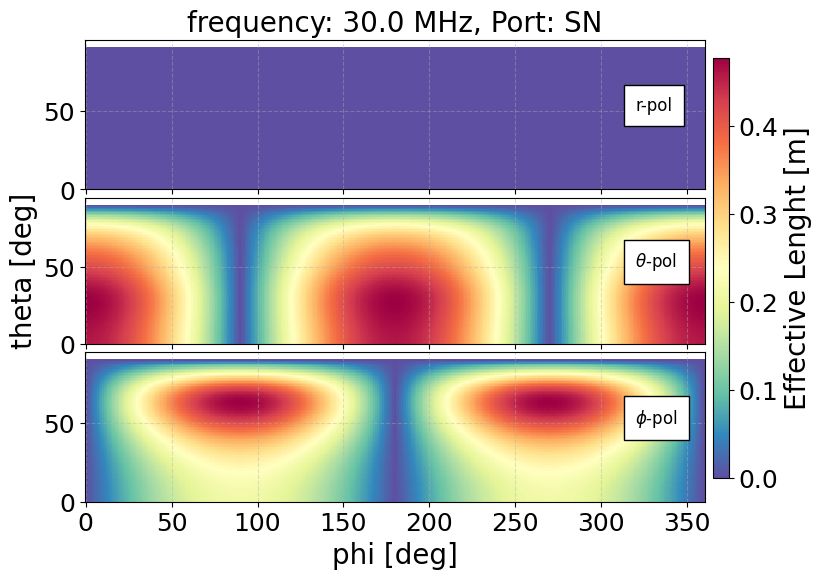
Antenna Model Exploration (antenna.ipynb)
Example output:
CoREAS E-field Analysis (coreas.ipynb)
ZHAireS E-field Analysis (zhaires.ipynb)
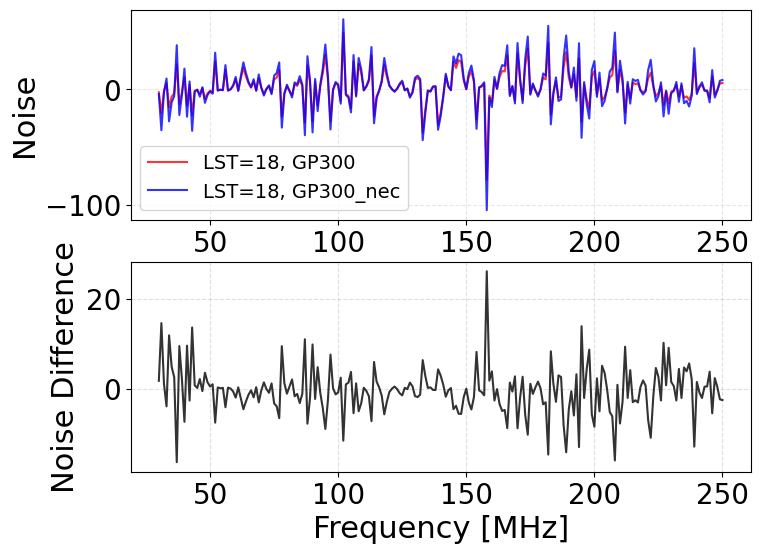
Galactic Noise Study (galactic_noise.ipynb)
Example output (notebook cells):
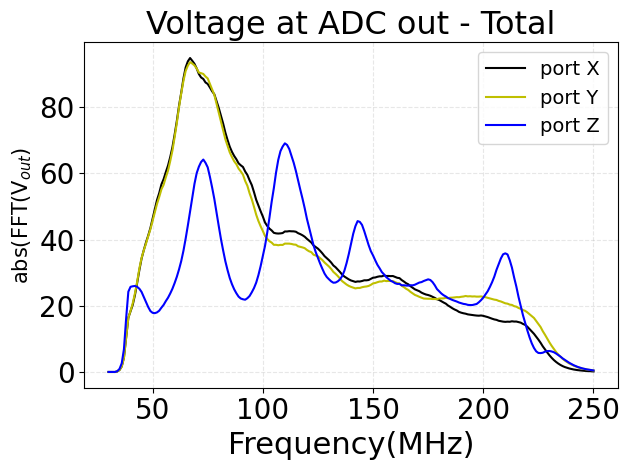
Plot Voltages at Device (plot_VoltageAtDevice.ipynb)
Example output (notebook cells):
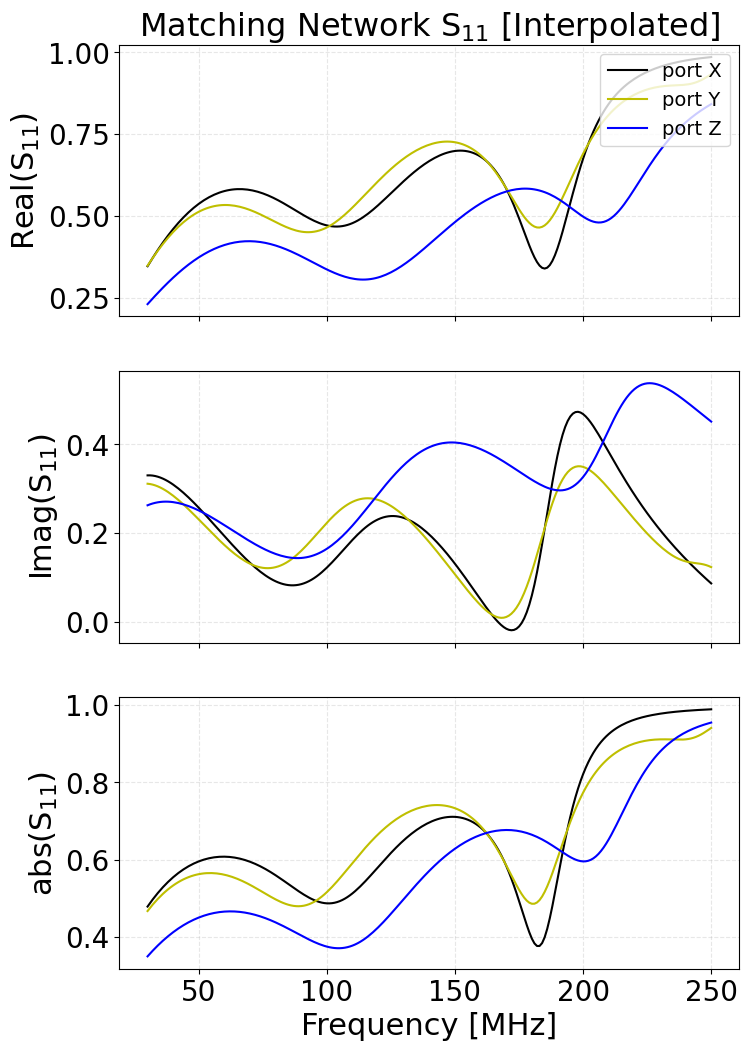
RF Chain Exploration (Notebook) (rf_chain_example.ipynb)
Example output (notebook cells):
End-to-end Shower Demo (Notebook) (shower_event.ipynb)
End-to-end Shower Demo (Script) (shower_event.py)
python shower_event.py
Example output:
Shower Frame:
{'location': ECEF([[-546142.87234436],
      [4771222.9364452 ],
      [4186334.74943439]]), 'basis': array([[ 0.08399931, -0.65427316,  0.75157883],
       [ 0.99279305,  0.11964829, -0.0068007 ],
       [-0.08547561,  0.7467335 ,  0.65960822]]), 'orientation': 'NWU', 'magnetic': True, 'declination': -0.5184295978295808, 'magmodel': 'IGRF13', 'obstime': '2020-01-01', 'rotation': None}
origin_geoid: [41.27 96.53  0.  ] # lat, lon, alt
Core=[   0.    0. 2025.]
obstime: 2020-01-01
Zenith: 92.0999984741211
Azimuth: 110.0
Xmax (shc): [[  98786.24]
 [-271412.97]
 [  12588.98]]
---------------------------------
Manual E-field \(\rightarrow\) Voltage (efield2voltage_manually.py)
examples/old/stubs/: it only prints that it does not work (#218).This script is not working at the moment. To check on how to convert Efield to Voltage, please check scripts/convert_efield2voltage.py
RF Chain Exploration (rf_chain_example.py)
python rf_chain_example.py [-h] [--lst LST] [--savefig] plot_option

Parser to select which noise quantity to plot. To Run: ./rf_chain_example.py <plot_option>. <plot_option>: galactic, lna balun_after_lna cable vga
balun_before_adc rf_chain. Add --lst <int> for galactic noise. i.e ./plot_noise.py galactic --lst 18.

positional arguments:
  plot_option  Option to select which noise quantity to plot.

options:
  -h, --help   show this help message and exit
  --lst LST    lst for Local Sideral Time, galactic noise is variable with LST and maximal for 18h.
  --savefig    don't add galactic noise.
read_modify_RF_chain_elements.ipynb
This notebook demonstrates loading and analyzing RF chain element responses using grand. sim.detector.rf_chain.
It computes S-matrix, ABCD-matrix, and impedances from Touchstone files (.s2p / .s1p) and provides plotting utilities.
Main functions:
Compute_S_ABCD_matrix_*— Load.s2pfiles and return S/ABCD matrices (dB, radians, or complex formats).Load_impedance/Ant_impedance— Compute load and antenna impedances.from_S_to_ABCD/from_ABCD_to_S— Convert between S and ABCD.from_*_to_TF— Compute voltage transfer functions.
Notes:
Place RF chain files in
data/detector/RFchain_v2/.Use
_dbfor dB input,_radif phase is in radians.
Grand
The grand directory is the core of GRANDlib. It provides modular building blocks for reading/writing GRAND root files, geospatial utilities, analysis-oriented event access, and simulation helpers. Its main subpackages are:Unlike the grand/scripts/ folder, which contains executable entry points, the modules here are mostly class and function definitions meant to be imported and reused. They are the foundation upon which higher-level workflows, pipelines, and scripts are built.
The directory is organized into the following subfolders:
aoi/ — Analysis-Oriented-Interface examples.
basis/ — Basic examples of signal visualization and trace handling.
dataio/ — Reading and manipulating GRANDROOT files directly.
geo/ — Coordinate systems, topography interpolation, and antenna positioning
recon/ — Reconstruction Algorithms
sim/ —Interfaces around E-field/voltage simulation steps.
Each subdirectory contains Python scripts or Jupyter Notebooks designed for a specific use case, from basic data browsing to full detector simulation pipelines. The examples are independent and can be run individually once the environment is properly configured using Docker or Conda. Outputs typically include printed event summaries, graphical displays of traces or antenna positions, and written ROOT files when needed.
AOI: Analysis-Oriented Interface
The grand/aoi package provides high-level data structures and convenience
classes for accessing, manipulating, and analyzing GRAND events.
Unlike the low-level simulation modules, AOI is designed for streamlined analysis:
loading detector events, navigating between showers, DUs, and traces, and applying
physics utilities without needing to manage ROOT trees directly.
antenna.pyDefines the
Antennaclass, representing a single GRAND antenna (Detection Unit, DU). Key attributes:DU ID and metadata.
Position and orientation (local Cartesian or geodetic coordinates).
Antenna tilt and hardware configuration.
This class serves as the entry point for per-antenna data such as traces or geometry.
event.pyProvides the
Eventclass, the central AOI object. It aggregates:Event ID, run number, and metadata.
Associated
Shower(physics properties).Collections of antennas and traces involved in the event.
Convenience methods for filtering, iteration, and reconstruction.
event_list.pyProvides the
EventListclass, which manages collections of events. Allows iteration, selection, slicing, and batch processing.shower.pyDefines the
Showerclass, encapsulating the physics of the extensive air shower. Attributes:Primary particle type (via PDG code).
Energy, zenith, and azimuth angles.
Core position.
Integrated with
event.pyso each event directly references its shower.timetrace.pyDefines the
TimeTraceclass, representing digitized voltage traces from antennas. Core methods:Access samples as NumPy arrays.
Compute power spectral density (FFT-based).
Extract features such as max amplitude, RMS, or pulse timing.
Basis: Signal Basis
The basis module defines primitives for handling GRAND signals and traces, including DU networks and pipelines.
signal.pyMinimal signal container(s) for time- and frequency-domain data with metadata. Typical features:
Sampling info (rate, dt, start time), units, and channel labels.
Convenience transforms (FFT/IFSFT), windowing, slicing, normalization.
Helpers to align, resample, and stack multi-channel traces.
type_trace.pyTrace typing and schema helpers to standardize how traces are tagged and validated. Common usage:
Enforce conventions (e.g.,
RAW,FILTERED,SIM,NOISE_ONLY).Validate shape/dtype/units before passing traces to downstream code.
Attach provenance (processing history) for reproducibility.
traces_event.pyLightweight loader and iterator for per-event, per-DU traces. Typical features:
Map {event, DU, channel} \(\rightarrow\) trace objects from ROOT/NPZ/HDF5.
Batch iteration for quick scans and QA plots.
Simple filters (by DU set, channel mask, amplitude thresholds).
du_network.pyUtilities for Detector Unit (DU) layouts and neighborhood queries. Typical features:
Build a graph from DU positions (kNN, radius graphs, hex grids).
Query nearest neighbors / rings / sectors for footprint analyses.
Export/import layout subsets for fast prototyping.
pipeline.pyTiny processing-pipeline framework to chain operations on traces/signals. Typical features:
Compose steps (filtering, whitening, windowing, feature extraction).
Pure-Python hooks (callables) + simple config dicts.
Consistent input/output contracts for easy swapping of steps.
Dataio: Data Input/Output
The grand/dataio package is the core I/O interface of GRANDlib.
It provides a ROOT-independent API for reading and writing GRANDROOT TTrees, so that end-users do not need direct ROOT knowledge.
The implementation hides internal schema details from both data generators and analysis users, ensuring compatibility even if file formats evolve in the collaboration:contentReference[oaicite:0]index=0.
data_handling.pyHigh-level API for opening, reading, and writing GRANDROOT files. Features:
Context manager to open ROOT files safely.
Wrappers to write NumPy arrays and Python structures into ROOT TTrees.
Unified interface for both event and run data.
data_tree.pyAbstractions for TTrees (generic tree manipulation). Provides:
Class definitions mapping ROOT branches to Python attributes.
Generic “tree descriptor” base classes.
Iteration and slicing over entries.
descriptors.pySchema descriptors that define the structure of GRANDROOT files. Contains Python classes/enums for branches, field types, and layouts, ensuring consistent typing across modules.
event_trees.pyImplements TTrees specific to per-event data. Manages:
Event metadata (IDs, run numbers, seeds).
Per-DU traces and associated properties.
Cross-links to shower info when present.
run_trees.pyImplements TTrees for run-level metadata. Contains information on:
Run configuration (layout, detector configuration).
Time stamps, logging, acquisition status.
Cross-references to multiple event TTrees.
root_files.pyRoot file manager class. Handles:
File creation and closing.
Mapping of Python containers to ROOT TTrees.
Transparent caching of objects for efficiency.
protocol.pyDefines internal protocol conventions between GRANDlib modules and data I/O. Provides abstract interfaces for “reader” and “writer” objects to ensure compatibility across modules. Example: specifying how a “Trace” object should be serialized/deserialized.
Geo: Geospatial Tools
The geo module provides transformations between geodetic, ECEF, and local frames, as well as access to topographic and geomagnetic models.
coordinates.pyImplements GRAND-specific coordinate systems and transformations. Features:
Conversion between geodetic (lat, lon, height), Earth-centered Earth-fixed (ECEF), and local tangent-plane (LTP) coordinates.
Support for orientation definitions: ENU (East-North-Up), site-centered Cartesian, and detector-aligned frames.
Vector operations and rotation matrices for shower direction handling.
coordinates_test.ipynbJupyter notebook with worked examples and tests of coordinate conversions. Demonstrates step-by-step transformations (e.g. geodetic \(\rightarrow\) ECEF \(\rightarrow\) LTP).
geomagnet.pyProvides access to Earth’s geomagnetic field using IGRF models. Features:
Compute magnetic field vector \(\vec{B}\) at site (lat, lon, height, date).
Returns \(B_x, B_y, B_z\) in a chosen coordinate frame.
Used for particle trajectory estimates and polarization studies.
topography.pyProvides terrain and elevation handling for GRAND sites. Features:
Download and cache DEM (Digital Elevation Model) tiles for a given radius around a site.
Interpolate elevation for arbitrary (x, y) positions in local frames.
Generate terrain grids for simulation layouts.
turtle.pyUtility for environment setup, file downloads, and caching of external data (DEM files, geomagnetic coefficients, etc.). Ensures reproducibility and offline availability.
gull.pyCompanion to
turtle.py, providing higher-level download management and wrappers around data resources (maps, models). Abstracts away details of file sources and storage.
Recon: Reconstruction
The recon module (currently under development) will host algorithms for air-shower reconstruction, including:
Shower direction fitting
Core position reconstruction
Energy estimation
Example workflows will be added in future releases.
Sim: Simulation Modules
The grand/grand/sim directory contains the main simulation primitives of GRANDlib.
It implements the detector response chain, stochastic noise models, shower handling,
and the high-level efield2voltage.py driver that ties everything together.
detector/
detector folder implements the hardware response of a GRAND detection unit
in modular stages: antenna, analog RF chain, and ADC digitizer.antenna_model.pyComputes antenna-domain responses: vector effective length (VEL), impedance vs. frequency, and conversion from incident \(\vec{E}(t)\) to open-circuit voltage \(V_\mathrm{oc}(t)\).
rf_chain.pyPropagates the antenna signal through the analog electronics (matching networks, LNAs, filters, baluns, cables, connectors). Uses transfer functions and S-parameters specified in
rf_chain_config.xml.rf_chain_config.xmlXML configuration file describing the detector’s RF chain, with paths to stage response files and per-stage enable/disable flags. Axis-specific placeholders (
{axis}) allow loading different files for X/Y/Z antenna arms.adc.pyModels the analog-to-digital converter: sampling rate, quantization, bit depth, and full-scale voltage. Converts analog voltages to digital counts for trigger and analysis studies.
process_ant.pyUtility routines to preprocess antenna responses (interpolation, smoothing, regridding) and prepare lookup tables for the chain.
noise/
noise folder provides galactic and instrumental noise models.
These are essential for realistic background modelling and trigger studies.Compute_Galactic_Noise.ipynbJupyter tutorial that walks through generating galactic noise spectra from sky-temperature maps and saving them to NumPy arrays.
Compute_Plot_Galactic_Noise.pyCommand-line script that computes and plots galactic noise PSDs for a given site and frequency range.
galaxy.pyCore noise generator module. Provides functions to compute or load galactic noise PSDs (\(N(f)\)) and convert them to time-domain traces.
galactic_Efield2_per_Hz_gp13_GP300.npyExample precomputed dataset with galactic noise PSD per Hz for site GP13, usable directly in simulations.
shower/
shower folder contains helpers for interfacing extensive air-shower simulations
with GRANDlib detector simulation.gen_shower.pyGenerates shower structures and metadata (energy, direction, core position, primary type) compatible with GRANDROOT. Can be used as both a module and a CLI tool.
pdg.pyProvides PDG particle code lookups: names, masses, and basic properties. Used to label primary cosmic rays (proton, iron, gamma, neutrino).
efield2voltage.py
Input: E-field traces from a shower simulation.
Antenna model: conversion to open-circuit voltage.
RF chain: propagation through analog electronics via transfer functions.
ADC: sampling and quantization to digital counts.
Optional: noise injection (galactic or instrumental).
Output: GRANDROOT files with voltage traces per DU and metadata.
Granddb
The granddb/ folder contains modules, helper classes, and command-line scripts to manage the GRAND database. It covers file staging and registration, monitoring extraction, materialized views, and Docker-based deployment of a local PostgreSQL instance synchronized with the master DB.
Structure
Doxyfile— Doxygen configuration for generating developer documentation.__init__.py— Empty marker file defininggranddbas a Python package.readme.md— Developer notes and examples.config.ini.example— Template configuration for the Data Manager.datamanager.py— Core class for repositories, file fetching, staging, and DB access.granddblib.py— Database functions and SQL/ORM access.rootdblib.py— Helpers for handling ROOT file metadata in the DB.ReadRootForDb.py— Example driver to fetch and register ROOT files.register_file_in_db.py— Register individual files.register_dir_in_db.py— Register all files in a directory.register_dataset_in_db.py— Register dataset-level directories.register_in_db.py— Generalized registration script (files, dirs, datasets).refresh_mat_views.py— Refresh database materialized views.monitoring.py— Extract monitoring information (ADC/Efield/Voltage traces).
Subfolder docker/:
granddb.dockerfile— Build a PostgreSQL 15.1 image withpgsyncandpgweb.db.conf.sample— Template configuration file for container credentials.create-db.bash— Initialize or restore schema, set sequences, runpgsync.startdbgrand.bash— Launch container with environment variables and port mapping.start-web.bash— Start thepgwebweb interface.pgsync.yml— Synchronization configuration (tables and filters).README.rst— Deployment and synchronization notes.
DataManager
Datamanager object is the main object to access data. It first gets its
configuration from an ini file (config.ini by default).
To run in docker, you need to use the grandlib/dev:1.2 version
to have all the requested libraries.
Inifile
Inifile is organized in sections.
The 6 sections are [general], [directories],
[repositories], [credentials], [database],
[registerer].
[general]
provider = "Your name"
socket_timeout = 5

[directories]
localdir = ["/path/to/incoming/dir", "/another/local/directory"]

[repositories]
; Name = [protocol,server, port, [paths]]
CC = ["ssh","cca.in2p3.fr",22,["/path/to/datas/","/another/path/"]]
WEB = [ "https", "github.com" , 443, ["/grand-mother/data_challenge1/raw/main/coarse_subei_traces_root/"]]

[credentials]
; Name =  [user, keyfile]
CC = ["login",""]
CCIN2P3 = ["login",""]
SSHTUNNEL = ["ssh_login",""]

[database]
; Name = [server, port, database, login, passwd, sshtunnel_server, sshtunnel_port, sshtunnel_credentials ]
database = ["dbserver.in2p3.fr", "" ,"dbname", "dbuser", "dbpass","ssh_tunnel.in2p3.fr", 22, "SSHTUNNEL"]

[registerer]
CCIN2P3 = "/sps/trend/fleg/INCOMING"
Directories are local directories where data should be.
Repositories are distant places where data are accessed
using protocols. Supported protocols: ssh, http,
https, local.
Sections [database] and [registerer] are optional.
Datamanager
When instantiated, a DataManager object will read its
configuration from the ini file. If a database is declared, it will
connect to the DB to get a list of other repositories.
The get_file function
The get_file(filename) function performs the following actions:
Search if the file exists in
localdir.If yes, return the path.
If not, search repositories. If found, copy to incoming dir and return path.
If not found, return
None.
Usage example:
import granddb.datamanager as datamanager
dm = datamanager.DataManager('config.ini')
file="Coarse3.root"
print(dm.get_file(file))
The get_dataset function
Works like get_file but retrieves an entire directory.
The search function
(Not yet fully implemented) – returns repositories/directories where a file can be found. Uses the database.
Test example
For Linux users
Edit and configure
examples/datalib/config.iniRun docker:
docker run -it -v /path/to/grand/lib:/home \
-v ${SSH_AUTH_SOCK}:/ssh-agent -e SSH_AUTH_SOCK=/ssh-agent \
--rm grandlib/dev:1.2
Inside docker:
source env/setup.sh
cd examples/datalib/
python datamanager_example.py
Verify file:
ls /home/examples/datalib/incoming/Coarse3.root
For Mac users
Mac does not allow SSH agent forwarding into docker, so you must start an agent inside docker:
docker run -it -v /path/to/grand/lib:/home \
-v /path/to/.ssh:/home/.ssh --rm grandlib/dev:1.2
Then inside docker:
eval $(ssh-agent)
ssh-add .ssh/id_rsa
source env/setup.sh
cd examples/datalib/
python datamanager_example.py
ls /home/examples/datalib/incoming/Coarse3.root
refresh_mat_views.py
python refresh_mat_views.py -c config.ini
monitoring.py
python monitoring.py -c config.ini
Quality
The quality/ folder provides tools for formatting, static analysis, type checking, and test coverage of the GRANDlib codebase. This helps ensure maintainability and correctness.
Setup
source env/setup.sh
python -m pip install -r quality/requirements.txt
Structure
check_score_coverage.pygrand_quality_all.bashgrand_quality_analysis.bashgrand_quality_clean.bashgrand_quality_format.bashgrand_quality_test_cov.bashgrand_quality_type.bashpylint.confmypy.confreadme.mdci/(apply_sonar_update.bash,coverage_if_necessary.bash,manage_sonar_update.py,pylint_ci.conf)
One-shot quality pass
bash quality/grand_quality_all.bash
Code formatting
grand/ and examples/ with Black :bash quality/grand_quality_format.bash
Static code analysis (Pylint)
quality/pylint.conf (notable options: disable, enable, ignored-classes).bash quality/grand_quality_analysis.bash
Example output :
grand/tools/fake.py:20: [E0602(undefined-variable), max_2_vectors] Undefined variable 'vb'
grand/tools/fake.py:45: [E1111(assignment-from-no-return), min_2_vectors_pos] Assigning result of a function call, where the function has no return
grand/tools/fake.py:47: [E1137(unsupported-assignment-operation), min_2_vectors_pos] 'v_min' does not support item assignment
Notes: The script writes a full report to quality/report_pylint.txt and returns Pylint’s exit status. In CI mode, use --exit-zero (see ci/apply_sonar_update.bash).
Unit tests and coverage
bash quality/grand_quality_test_cov.bash
Artifacts:
quality/report_coverage.xml(Cobertura XML)quality/html_coverage/index.html(per-file annotated HTML)
Example tail of console summary:
==== test session starts ====
platform linux -- Python 3.10.8, pytest-6.2.5, pluggy-1.0.0
collected 90 items

tests/test_manage_log.py::test_check_logger_level PASSED
tests/test_manage_log.py::test_get_string_now PASSED
...
Name                                      Stmts   Miss   Cover
----------------------------------------------------------------------------
TOTAL                                      6192    2505    60%
Coverage threshold check
python quality/check_score_coverage.py
Possible output:
coverage percent: 60%
Coverage percent is failed, threshold is 80%

or

Coverage successful
Type checking (mypy)
bash quality/grand_quality_type.bash
Report: quality/report_type.txt. Third-party packages (e.g., numpy, astropy) are ignored where stubs are unavailable (see mypy.conf).
Selective tests
pytest tests/tools/test_fake.py::test_to_fix -q
Cleaning reports
bash quality/grand_quality_clean.bash
SonarQube integration
quality/ci/ folder integrates coverage and static checks with SonarQube.ci/apply_sonar_update.bash— runs coverage + Pylint and pushes viasonar-scannerifsonar.propertiesis present.ci/coverage_if_necessary.bash— triggers coverage only when the cached report is missing.ci/manage_sonar_update.py— orchestrates whether and how to update (e.g., sets project key/name based on branch/user).ci/pylint_ci.conf— lightweight Pylint ruleset for CI jobs.
Usage:
# From repo root, with sonar-scanner in PATH and a sonar.properties file configured:
bash quality/ci/apply_sonar_update.bash
Online metrics
Summary
Scripts
The scripts/ folder contains command-line tools for converting simulation outputs, exploring/plotting the RF chain, inspecting GRANDROOT files, extracting events, and handling data logistics (archiving/transfers). Most scripts assume an initialized GRANDlib environment.
Structure
convert_efield2voltage.py— E-field \(\rightarrow\) voltage (with RF chain, noise).convert_efield2efield.py— Make “hardware-like” E-field (filters, jitter, noise).convert_voltage2adc.py— Voltage \(\rightarrow\) ADC traces (optionally add measured noise).plot_rf_chain.py— RF chain component plots (lna,cable,vga, etc.).plot_Vout_AT_Device.py— Voltage at each RF-device or voltage ratios (plot, optional save).Compute_Vout_AT_Device_save.py— Same as above but outputs text tables.extract_rf_chain.py— Export global RF chain transfer function arrays.plot_tmax_vmax.py— Quick diagnostics of trace maxima positions and levels.open_grand_file.py,open_grand_directory.py,open_grand_analysis_prompt.py— Interactive explorers.extract_events.py— Copy selected events (by run/event) into a target directory.T1_trigger_offline.py— Offline trigger features from ADC traces (threshold crossing, quiet time).get_version.py— Print installed GRANDlib version.Sample data/outputs:
test_efield.root,Output_Voltage_*,Voltage_ratio_*.
Subfolders:
figures/— Auto-saved plots from RF chain utilities (S-params, impedance, noise).lna/,cable/,vga/,matching_network/,balun_before_adc/,balun_after_lna/— Precomputed S-parameter figures.hooks/—update_rootfile_version.py(optional pre-commit: bumpgrand/dataio/versionon file changes).archiving/— CC-IN2P3 monthly raw-data archiving helpers (SLURM jobs, configs).transfers/— Registration/conversion/monitoring helpers (SLURM wrappers, DB registration).
E-field / Voltage / ADC pipeline
# Basic (adds RF chain + galactic noise by default)
python3 scripts/convert_efield2voltage.py <sim_folder>

# Reproducible noise and LST:
python3 scripts/convert_efield2voltage.py <sim_folder> \
  --seed 0 --lst 18

# Antenna model selection (GP300 | GP300_nec | GP300_mat | Horizon):
python3 scripts/convert_efield2voltage.py <sim_folder> \
  --du_type GP300_nec

# Pure Voc (no noise, no RF chain):
python3 scripts/convert_efield2voltage.py <sim_folder> -o voc.root \
  --no_noise --no_rf_chain
Notes: Supports padding control (--padding_factor) or fixed duration (--target_duration_us). Specialized RF chain layouts: --rf_chain_gaa (Auger), --rf_chain_nut (after LNA at nut).
``convert_efield2efield.py`` — derive a “hardware-like” E-field (apply filters, optional Gaussian noise/jitter, calibration smearing; resample/retime).
python3 scripts/convert_efield2efield.py <efield_dir> \
  --add_noise_uVm 10 --add_jitter_ns 2 --calibration_smearing_sigma 0.05 \
  --target_duration_us 10 --target_sampling_rate_mhz 500 -o out_efield.root
``convert_voltage2adc.py`` — convert analog voltage traces (TVoltage) to digital ADC (TADC); can add measured noise from a directory of GRANDROOT runs.
# Pure conversion:
python3 scripts/convert_voltage2adc.py <sim_folder>

# Add measured noise (do not double-add galactic noise):
python3 scripts/convert_voltage2adc.py <sim_folder> \
  --add_noise_from /path/to/measured/noise_dir -s 42
Output: A GRANDROOT file with a TADC tree mirroring the input TVoltage events/DUs.
RF chain exploration: plots and exports
# Options: MatchingNetwork | lna | balun_after_lna | cable | vga | balun_before_adc | rf_chain | rf_chain_gaa
python3 scripts/plot_rf_chain.py lna
python3 scripts/plot_rf_chain.py rf_chain_gaa
``plot_Vout_AT_Device.py`` — plot voltage at devices or voltage ratios across the chain; optionally save to scripts/figures/.
# Voltages at device: Vin_balun1 | Vout_balun1 | Vout_match_net | Vout_lna | Vout_cable_connector | Vout_VGA | Vout_tot
python3 scripts/plot_Vout_AT_Device.py Vout_lna --savefig

# Ratios: Vratio_Balun1 | Vratio_match_net | Vratio_lna | Vratio_cable_connector | Vratio_vga | Vratio_adc
python3 scripts/plot_Vout_AT_Device.py Vratio_lna --savefig
Saved figures: scripts/figures/*.png (S-params, impedances, noise overlays, etc.).
``Compute_Vout_AT_Device_save.py`` — same physics as above, but writes numeric tables in the CWD.
python3 scripts/Compute_Vout_AT_Device_save.py Vout_lna --savedata
# Creates: Output_Voltage_lna, Voltage_ratio_lna, ... (text tables: frequency [MHz], value)
``extract_rf_chain.py`` — export combined RF chain TF to NumPy arrays for downstream use.
python3 scripts/extract_rf_chain.py
# Writes: TF_RF_Chain.npy (frequency vector + complex TF per arm)
Data inspection helpers
# Open a file as DataFile `f`:
python3 scripts/open_grand_file.py path/to/file.root

# Open a directory as DataDirectory `d` (verbose on by default):
python3 scripts/open_grand_directory.py /path/to/grand_dir

# Open a directory as EventList `ev` and stay in (I)Python:
python3 scripts/open_grand_analysis_prompt.py /path/to/grand_dir
# Add -p for Python (not IPython), -s to suppress banner, -nv for non-verbose
Event extraction
# List file format: one per line -> <dir_path>,<run_number>,<event_number>
python3 scripts/extract_events.py source_events.csv extracted_events_dir -c "my_subset" -ow
Quick trace diagnostics
python3 scripts/plot_tmax_vmax.py <efield.root>
Offline trigger utilities
Version helper
grand/dataio/version).python3 scripts/get_version.py
# -> version=0.x.y
Archiving
archiver.bash— self-resubmitting monthly SLURM job (configure dates, mail, memory).archive_grandraw.bash— archives raw data older than a retention threshold to iRODS (paths, naming, java tool if needed).config.properties.*,dc_*.xml— site-specific configs (e.g.,gp13,gp80,gaa).
Example: submit archiver.bash with sbatch to start a monthly cycle; logs are written to a dated archiving-YYYY-MM directory.
Transfers and registration
bintoroot.bash,convert_not_converted.bash— batch conversion of raw bin files to GRANDROOT.register_convert.py,register_transfers.py,register_transfer.bash— database registration of conversions/transfers.run_monitoring.bash,refresh_mat_views.bash— monitoring and DB view refresh.setup_network_auger.bash— convenience setup for remote mounts.
Hooks
grand/dataio/* files change, bump grand/dataio/version and add it to the commit.Figures
scripts/figures/ (S-parameters, impedances, global TF, noise PSD overlays). Many precomputed PNGs are provided as references.Notes
source env/setup.sh). For RF-chain plots/saves, use the provided options and --savefig/--savedata to capture artifacts (PNG or text tables).Cheat Sheet — Daily Commands
--help to any command to see full options.# 0) Environment
source env/setup.sh
# 1) E-field -> Voltage (adds RF chain + galactic noise)
python scripts/convert_efield2voltage.py <sim_folder>
# 2) Voltage -> ADC (add measured noise from a directory)
python scripts/convert_voltage2adc.py <sim_folder> --add_noise_from \
<noise_dir> -s <seed>
# 3) RF-chain overview (component or full chain)
python3 scripts/plot_rf_chain.py rf_chain # or: lna, vga, cable, ...
# 4) Voltage at device (save PNGs under scripts/figures/)
python3 scripts/plot_Vout_AT_Device.py Vout_lna --savefig
# 5) Export combined RF-chain transfer function (NumPy)
python3 scripts/extract_rf_chain.py # -> TF_RF_Chain.npy
# 6) Quick analysis REPL on a GRAND directory
python3 scripts/open_grand_analysis_prompt.py /path/to/grand_dir
# 7) Extract a list of events into a clean directory (CSV: dir,run,event)
python3 scripts/extract_events.py source_events.csv extracted_events_dir -ow
Reproducible variant (fixed seed/LST & antenna model):
python3 scripts/convert_efield2voltage.py <sim_folder> \
  --seed 0 --lst 18 --du_type GP300_nec
Sim2Root
The sim2root/ folder help us convert simulated outputs (CoREAS, ZHAireS) into GRANDROOT files and provides end-to-end helpers to generate voltages/ADC and visualize results.
Structure
README.md— Project notes and quick how-tos.ComandsToActualizeExamples.txt— Step-by-step commands to regenerate example RawRoot/GRANDROOT artifacts.Folders:
Common/— Core conversion + pipeline utilities and examples.ZHAireSRawRoot/— ZHAireS‐specific readers/generators and example inputs.CoREASRawRoot/— CoREAS‐specific readers/converters and example inputs.
In GRAND we aim to simulate air showers using both ZHAireS and CoREAS. The RawRoot file format is a step toward a common output between these two generators and is based on the GRANDRoot schema. The idea is that RawRoot serves as the starting point from which final GRANDRoot files are produced.
GRANDRoot format, follow these steps.RawRoot files from CoREAS simulations.# From inside CoREASRawRoot/
python3 CoreasToRawROOT.py -d proton
# or point to any CoREAS run directory
python3 CoreasToRawROOT.py -d /path/to/coreas/run_dir
RawRoot files from ZHAireS simulations.Explicit mode (only “standard” mode available):
# From inside ZHAireSRawRoot/
python3 ZHAireSRawToRawROOT.py InputDirectory Mode RunID EventID OutputFilename

# Examples
python3 ZHAireSRawToRawROOT.py ./GP300_Xi_Sib_Proton_3.8_51.6_135.4_1618 \
  standard 1 1618 GP300_Xi_Sib_Proton_3.8_51.6_135.4_1618.rawroot

python3 ZHAireSRawToRawROOT.py ./GP300_Xi_Sib_Proton_3.87_79.4_310.0_13790 \
  standard 1 13790 GP300_Xi_Sib_Proton_3.87_79.4_310.0_13790.rawroot
Auto mode (script chooses sensible defaults):
python3 ZHAireSRawToRawROOT.py GP300_Xi_Sib_Proton_3.8_51.6_135.4_1618
This is equivalent to RunID="SuitYourself", EventID="LookForIt", OutputFileName="GRANDConvention". See the script for details.
Common/sim2root.py. As input, provide the .rawroot file(s) created by the previous step.python3 ../grand/sim2root/Common/sim2root.py "<your_path>/*/*.rawroot" \
-sl GP300 -d 20221026 -t 180000 -e DC2Alpha \
--trigger_time_ns 800 --target_duration_us 4.096
# -sl (site layout) is required; the two trace-window options are needed
# when the showers were simulated with different windows
# For options:
python3 ../grand/sim2root/Common/sim2root.py --help
.rawroot files in grand/sim2root/ZHAireSRawRoot/. You may substitute any .rawroot files.Full pipeline (with noise/jitter):
# From inside Common/
python3 RunSimPipe.py ../ZHAireSRawRoot ZHAireS -sl GP300
This executes, in order:
# rawroot -> grandroot
python3 ./sim2root.py ../ZHAireSRawRoot/ --target_duration_us=4.096 --trigger_time_ns 800 -sl GP300 -e ZHAireS

# compute voltage
python3 ../../scripts/convert_efield2voltage.py \
  sim_Xiaodushan_20221026_000000_RUN1_CD_ZHAireS_0000/ \
  --seed 1234 --target_duration_us 4.096 --add_jitter_ns 5 \
  --calibration_smearing_sigma 0.075 --verbose info \
  -o sim_Xiaodushan_20221026_000000_RUN1_CD_ZHAireS_0000/voltage_1618-13790_L0_0000.root

# compute ADC
python3 ../../scripts/convert_voltage2adc.py \
  sim_Xiaodushan_20221026_000000_RUN1_CD_ZHAireS_0000/

# compute DC2 efield
python3 ../../scripts/convert_efield2efield.py \
  sim_Xiaodushan_20221026_000000_RUN1_CD_ZHAireS_0000/ \
  --add_noise_uVm 22 --add_jitter_ns 5 --calibration_smearing_sigma 0.075 \
  --target_duration_us 4.096 --target_sampling_rate_mhz 500
.rawroot in grand/sim2root/CoREASRawRoot/.# From inside Common/
python3 RunSimPipeNoJitter.py ../CoREASRawRoot CoREAS-NJ -sl GP300
This executes:
# rawroot -> grandroot
python3 ./sim2root.py ../CoREASRawRoot/ --target_duration_us=4.096 --trigger_time_ns 800 -sl GP300 -e CoREAS-NJ

# compute voltage (no noise)
python3 ../../scripts/convert_efield2voltage.py \
  sim_Dunhuang_20170401_000000_RUN1_CD_CoREAS-NJ_0000/ \
  --seed 1234 --target_duration_us 4.096 --verbose info --no_noise \
  -o sim_Dunhuang_20170401_000000_RUN1_CD_CoREAS-NJ_0000/voltage_4100-4100_L0_0000.root

# compute ADC
python3 ../../scripts/convert_voltage2adc.py \
  sim_Dunhuang_20170401_000000_RUN1_CD_CoREAS-NJ_0000/

# compute DC2 efield
python3 ../../scripts/convert_efield2efield.py \
  sim_Dunhuang_20170401_000000_RUN1_CD_CoREAS-NJ_0000/ \
  --target_duration_us 4.096 --target_sampling_rate_mhz 500
python3 IllustrateSimPipe.py ./sim_Xiaodushan_20221026_000000_RUN1_CD_ZHAireS_0000
# For options:
python3 IllustrateSimPipe.py -h
CoREASRawRoot/
CoreasToRawROOT.py
RawShower, RawEfield, SimCoreasShower).Expected inputs (in ``path``)
*.reas— CoREAS per-antenna E-field files (headers include antenna coords, sampling, \(t_0\)).*.inp— CORSIKA input; primary, energy, observation levels, thinning, models, etc.*.dat— shower longitudinal profiles / particle tables, as produced in the run.*.log— run log with CPU time, seeds, versions, exit status.
Extracted information
Simulation parameters: primary type, \(E_{\text{primary}}\) [GeV], zenith/azimuth [deg], thinning settings, hadronic/low-energy models, random seed.
Shower profiles: depth/slant-depth grids [g/cm\(^2\)], particle/energy-deposit longitudinal profiles (gammas, \(e^\pm\), \(\mu^\pm\), hadrons, nuclei, neutrinos, cuts/ionization).
E-field data: DU/antenna IDs, names, positions (site coords), \(t_0\), \(t_{\text{pre}}\), \(t_{\text{post}}\), \(\Delta t\), traces \(E_x(t), E_y(t), E_z(t)\), peak-to-peak summaries.
Environment: refractivity model & parameters, atmospheric tables (altitude, density, depth), magnetic field (inclination/declination/modulus).
Derived: \(X_{\mathrm{max}}\) depth/position/altitude, distance to \(X_{\mathrm{max}}\), shower core position, CPU time, event date/unix time.
Created ROOT trees
RawShower— per-event shower metadata and longitudinal tables (seeRawShowerTreefields).RawEfield— per-event, per-DU E-field metadata and traces (seeRawEfieldTreefields).SimCoreasShower— CoREAS/CORSIKA-specific configuration (thinning, cuts, model versions, etc.).
.root file written in the working/output directory. The filename encodes key run parameters (e.g. energy/zenith/azimuth and array/run identifiers) for traceability.Validate presence of required input files in
path(glob for.reas/.inp/.dat/.log).Parse
.inpfor primary, energy, angles, thinning, models, seeds.Parse
.datfor longitudinal depth grids and particle/energy-deposit profiles.Parse
.reasheaders for DU metadata; load traces and timing.Parse
.logfor runtime, versions, timestamps.Create ROOT file & TTrees; fill branches for shower, efield, and CoREAS-specific config.
Write & close; return (or
sys.exitin script mode).
Energies in GeV; angles in degrees; positions in meters (site frame); depths in g/cm\(^2\); densities in g/cm\(^3\).
Time: \(t_0\), \(t_{\text{pre}}\), \(t_{\text{post}}\) and \(\Delta t\) as provided by CoREAS; unix time from logs if available.
Coordinate frames: shower coordinates for \(X_{\mathrm{max}}\) position; site/local frame for DU positions.
python CoreasToRawROOT.py -d <path_to_directory>
# or for a single CoREAS shower:
python CoreasToRawROOT.py --file <path_to_SIMxxxxxx.reas>
CorsikaInfoFuncs.py
find_input_vals(line) — Read a single numeric token (supports scientific notation) from a SIM.reas / RUN.inp line.find_input_vals_list(line) — Read a list (up to a handful) of numeric tokens from a SIM.reas / RUN.inp line.read_params(input_file, param) — Scan file for the first line containing param; parse and return the first number.read_list_of_params(input_file, param) — Reads a list of numerical values associated with a specified parameter from Corsika SIM.reas or RUN.inp files.read_atmos(input_file) — Reads atmospheric information from a Corsika RUN.inp file.read_date(input_file) — Reads the date information from a Corsika RUN.inp file.read_site(input_file) — Reads the site information (e.g., Dunhuang, Lenghu) from a Corsika RUN.inp file.read_lat_long_alt(site) — Hard-coded site lookup.read_first_interaction(log_file) — Reads the height of the first interaction from a Corsika log file.read_HADRONIC_INTERACTION(log_file) — Reads information about the hadronic interaction model used from a Corsika log file.read_coreas_version(log_file) — Reads the CoREAS version used from a Corsika log file.antenna_positions_dict(pathAntennaList) — Parse antenna positions from SIM??????.list (“AntennaPosition = x y z name”). Converts coordinates to meters and derives IDs from common naming conventions; falls back to sequential IDs if unrecognized.get_antenna_position(pathAntennaList, antenna) — FRetrieves the position of a specific antenna from a Corsika SIM??????.list file.calculate_array_shift(pathAntennaList) — Compute average offset between two antenna layouts (SIM vs. reference). Current implementation reads both from the same file (shift typically zero).read_long(pathLongFile) — Reads the longitudinal profile data from a Corsika .long output file.from CorsikaInfoFuncs import (
read_params, read_list_of_params, read_site, read_lat_long_alt,
antenna_positions_dict, get_antenna_position, read_long
)
E0_GeV = read_params("RUN.inp", "ERANGE") # -> float
angles = read_list_of_params("RUN.inp", "THETAPHI") # -> ["zenith", "azimuth", ...]
site = read_site("RUN.inp") # "Dunhuang" / "Lenghu" / atmos tag
lat, lon, alt_cm = read_lat_long_alt(site) # alt in cm
ants = antenna_positions_dict("SIM000123.list") # dict with x,y,z [m], name, ID
x,y,z = get_antenna_position("SIM000123.list", "DU0101")
n,dE,hp = read_long("SIM000123.long") # hp[0]=Xmax, hp[1]=Chi
PlotEventTraces.py
Usage (indicative).
# Basic: auto-detects what to plot from filename
python sim2root/CoREASRawRoot/PlotEventTraces.py tefield_*.root
GP300.list
ZHAireSRawRoot/
ZHAireSRawToRawROOT.py
EventID is the ID of the Event is going to be associated with. If EventID is “LookForIt” it will asume that the event ID is the last digits of the .sry file, after the _ and before the .sry extension
TaskName is what ZHAireS uses to name all the output files. And it generally the same as the “EventName”. If you want to change the Name of the event when you store it, you can use the “EventName” optional parameter If you dont specify a TaskName, it will look for any .sry file in the directory. There should be only one .sry file on the folder for the script to work correctly
OutputFileName is where you want to save the RawRootFile. If you select “GRANDConvention” it will attempt to apply the GRAND data storage convention.
[site]_[date]_[time]_[run_number]_[mod]_[extra], taking the data from the sry and its file name, asuming it is extra_.sry,
ForcedTPre forces the tpre of the trace to be the given number in ns, by adding or 0 or removing bins at the start of the trace when necessary ForcedTPost forces the tpost of the trace to be the given number in ns, by adding or 0 or removing bins at the end of the trace when necessary
TriggerSim modifies the time window so that the t0 indicates the position of the maximum of the electric field vector, and this is exactly after the desired TPre (ore -TimeWindowMin) time
Note that TPre is -TimeWindowMin from ZHAireS (so its usually positive)
The routine is designed for events simulated with ZHAireS 1.0.30a or later.
It requires to be present in the directory: - 1) A TaskName.sry file, with a “TaskName” inside, that is what ZHAireS uses to name all the output files. If “EventName” is not provided in the function input (maybe you want to override it), it will use TaskName as EventName (recommended). Note that Aires will truncate the TaskName if it is too long, and the script will fail. Keep your TaskNames with a reasonable lenght. ZHAiresRawToRawROOT will take Energy, Primary, Zenith, Azimuth, etc of the simulation from that file. This has the upside that you dont need to keep the idf file (which is some MB) and you dont need to have Aires installed on your system. But it has the downside that the values are rounded to 2 decimal places. So if you input Zenith was 78.123 it will be read as 78.12
Since in Aires 19.04.10 there is a python interface that could read idf files, we could get the exact value from there, but for now i will keep it as it is. Just dont produce inputs with more than 2 decimal places!
All the a##.trace files produced by ZHAireS with the electric field output (you have to have run your sims with CoREASOutput On)
a TaskName.EventParameters file , where the event meta-ZHAireS data is stored (for example the core position used to generate this particular event, the “ArrayName”, the event weight, the event time and nanosecond etc.
Optional: the necesary longitudinal tables file. If they dont exist, but the TaskName.idf file is present and and Aires is installed in the system, AiresInfoFunctions will take care of it.
In the input file, antenna names must be of the format A+number of antena, i.e., A1, A2….A100…etc
The script output is the shower reference frame: this means a cartesian coordinate system with the shower core at 0,0, GroundAltitude (masl). Electric fields are output on the X,Y and Z directions in this coordinate system.
Usage.
# From the repo root
python3 ZHAireSRawToRawROOT.py ./GP10_192745211400_SD075V standard 0 3  GP10_192745211400_SD075V.root"
Notes. If your event directory is compressed, unpack it first (see below) or use the compress/expand helper.
ZHAireSCompressEvent.py
eventdir (str): the directory containing the ZHAireS event, as it finished the sim
action (str): action to perform:
archive: compress + delete,
compress: store all necessary output files on a tgz
uncompress or expand: uncompress the tgz
delete: erese all the simulation files. Works only if a tgz is present (to be sure you are not deleting with no backup)
clean: erase uneeded files (ZHAireS runner auxiliary files)
help: show what each action does
Returns:
nothing if completed
0 if no action taken
-1 if error
Usage.
# Compress a directory -> .tgz
python sim2root/ZHAireSRawRoot/ZHAireSCompressEvent.py  <event_dir> compress

# Expand a .tgz to directory
python sim2root/ZHAireSRawRoot/ZHAireSCompressEvent.py  <event_dir.tgz> expand
ZHAireSInputGenerator.py
Note that:
Energy will be rounded to 5 significant digits, becouse then in the Aires summary they are rounded and the summary is used by other scripts to get the parameters.
Zenith and azimuth to 2 decimals
EventName, the name of the task. All files in the run will have that name, and some extension. It is usually also the name of the .inp, but not necessarily
Primary [PDG]: https://pdg.lbl.gov/2007/reviews/montecarlorpp.pdf Proton, Iron, Gamma, or see Aires Manual
Zenith [deg, PointToSource (CR) or IncomingDirection (primary direction) [deg] TODO, implement it, find a cool name
Azimuth [deg, CR or Neutrino convention, geomagnetic, North is 0, West is 90, South 180, East 270, Negative not allowed. deg]:
Energy [GeV]
RandomSeed A number from (0 to 1). “Automatic” produces a random number. “Aires” leaves the work of setting a random seed to Aires.
OutPutFile: The output filename and path
OutMode: “a” for append, “w”? to create a new file and erase the old? TODO:check this
AngularConvention: “Source” or “Incoming”
PrimaryConvention: “PDG” or “Aires”
Example
python ZHAireSInputGenerator.py TestEvent 2212 1.2345E9 67.89 0 GRAND.VeryCoarse.Subei.Skeleton.inp layout_datachallenge.dat
AiresInfoFunctionsGRANDROOT.py
Example
python AiresInfoFunctionsGRANDROOT.py <file.sry> GRAND/AIRES
Common/
sim2root.py
— Convert RawRoot \(\rightarrow\) GRANDROOT
The file sim2root/Common/sim2root.py converts simulator RawRoot outputs (CoREAS or ZHAireS)
into standard GRANDROOT files. It writes both run-level and event-level trees:
TRun, TRunEfieldSim, TRunShowerSim, TShower, TShowerSim, TEfield.
This standardization makes the files immediately consumable by scripts/convert_efield2voltage.py and downstream tools.
Inputs
One or more RawRoot files or a directory with RawRoot files or a text list (
.txt) of absolute/relative paths.Optional site metadata to override simulator headers (site name/layout, geodetic origin).
Units & Conventions
Position: meters; angles: degrees (zenith, azimuth); time: ns (samples) and \(\mu\)s (window); frequency: MHz.
E-field traces in
TEfield: typically \(\mathrm{\mu V/m}\) or \(\mathrm{V/m}\) (depends on simulator); the unit is recorded in run/event trees.DU coordinates are stored in site-local frames and geodetic forms (see tree overview below).
Directory:
sim_<SITE>_<YYYYMMDD>_<HHMMSS>_RUN<NN>_CD_<extra>_<SN4>Run-level:
run_<run>_L<level>_<SN4>.root,runshowersim_<run>_L<level>_<SN4>.root,runefieldsim_<run>_L<level>_<SN4>.rootEvent-level:
shower_<first-last>_L<level>_<SN4>.root,showersim_<first-last>_L<level>_<SN4>.root,efield_<first-last>_L<level>_<SN4>.root
Notes: <SN4> is a 4-digit serial to avoid collisions. Event files bundle ranges unless --events_per_file or --star_shape dictates otherwise.
python sim2root/Common/sim2root.py FILE_OR_DIR [options]
Positional
file_dir_name(one or more): RawRoot file(s), a directory with RawRoot, or a.txtlist of paths.
Key options
-o, --output_parent_directory DIRParent of the auto-namedsim_*directory (default: CWD).-fo, --forced_output_directory DIRUse this exact output directory (skip auto-naming).-s, --site_name STRSite name string stored in run trees (e.g.,GP13).-sl, --site_layout STRLayout tag (e.g.,GP13,GP80,GAA). Required unless--star_shape.-d, --sim_date YYYYMMDD,-t, --sim_time HHMMSSOverride date/time used in directory names.-e, --extra STRFree text embedded in directory name (spaces/_ are sanitized).-av, --analysis_level INTAnalysis level stored in filenames (default:0).-la, --latitude DEG,-lo, --longitude DEG,-al, --altitude MOverride site geodetic origin (fallback: RawRoot header).-ru, --run INTForce run number (default: taken from RawRoot if present).-se, --start_event INTOffset the first event index (useful when batching).--target_duration_us FLOATForce total trace duration (\(t_\mathrm{pre}+t_\mathrm{post}\)) in \(\mu\)s.--trigger_time_ns FLOATShift so the waveform maximum lands at the given ns offset.-ef, --events_per_file INTMaximum events per event-level file (split ranges).-ss, --star_shapeStar-shape mode: create a separate run per event.--verbose {debug,info,warning,error,critical}Logger verbosity (default:info).
Discovers input files (from paths or lists), filters for RawRoot, checks readability.
Reads simulator trees (CoREAS/ZHAireS metadata + per-DU traces) and initializes GRANDROOT run/event trees.
Determines site geodesy from RawRoot or overrides via CLI; builds site-local frames.
Converts DU positions between site-local and geodetic forms and records both.
(Optional) Adjusts trace timing:
--target_duration_uspads with zeros or trims to the requested window.--trigger_time_nsshifts each trace so its maximum aligns to the specified offset.
Writes run-level trees once per run and event-level trees batched by range (or one-per-event in star-shape).
Finalizes filenames with serial suffixes and event-index ranges, ensuring collision-free outputs.
TRun —
run,site_name,site_layout,datetime,analysis_level.TRunShowerSim — simulator tag (
coreas/zhaires), version,n_events,geom_origin_geodetic.TRunEfieldSim — sampling rate [Hz],
n_samples, bandwidth [MHz], E-field unit.TShower —
event,zenith_deg,azimuth_deg,core_x_m,core_y_m,xmax_gcm2(if available).TShowerSim —
primary_pdg,energy_primary_gev,interaction_model,seed(if provided).TEfield —
du_id,channel(X/Y/Z),n_samples,dt_ns,t0_ns,efield[](array),du_pos_local_m,du_geodetic.
--target_duration_uscontrols total window duration (pre+post); traces are zero-padded or trimmed symmetrically unless an explicit trigger shift is also requested.--trigger_time_nsredefines the alignment reference: the sample with the global maximum is shifted so its timestamp equals the requested ns from the start of the window.If both are given, the window size is enforced first, then the trigger alignment is applied.
<sim_dir>/
  sim_GP13_20250825_142233_RUN127_CD_batch-aug25_0123/
    run_127_L0_0123.root
    runshowersim_127_L0_0123.root
    runefieldsim_127_L0_0123.root
    shower_000001-000200_L0_0123.root
    showersim_000001-000200_L0_0123.root
    efield_000001-000200_L0_0123.root
    ...
python sim2root/Common/sim2root.py <RawRoot.root> -sl GP13 -o <sim_dir> -e test-coreas
B) A directory of RawRoot files; limit events per file
python sim2root/Common/sim2root.py /data/RawRoot/CoreasBatch/ \
  -sl GP80 -ef 100 -o <sim_dir> -av 1 -e batch-aug25
C) Enforce trace timing (duration + trigger position)
python sim2root/Common/sim2root.py <RawRoot.root> \
  -sl GAA --target_duration_us 10.0 --trigger_time_ns 150 \
  -o <sim_dir> -e tuned-window
D) Star-shape: one run per event (per-event bookkeeping)
python sim2root/Common/sim2root.py <RawRoot.root> -ss -sl GP13 -o <sim_dir> -e starshape
# 1) Convert RawRoot -> GRANDROOT (efield/shower); writes the folder
#    <parent_dir>/sim_<site>_<date>_<time>_RUN<run>_CD_<extra>_<serial>
python sim2root/Common/sim2root.py <RawRoot.root> -sl GP13 -o <parent_dir>

# 2) E-field -> Voltage (adds RF chain + galactic noise), into that folder
python scripts/convert_efield2voltage.py <sim_folder>

# 3) Voltage -> ADC (optionally add measured noise), into that folder
python scripts/convert_voltage2adc.py <sim_folder> \
  --add_noise_from /path/to/noise_dir -s 42
sim2root.py standardizes simulator outputs into GRANDROOT, records provenance and geodesy, exposes consistent trees/branches, and offers precise control over timing and file granularity. It is the recommended entry-point for moving from CoREAS/ZHAireS RawRoot to the GRANDlib analysis pipeline.RunSimPipe.py
What it does.
Calls
Common/sim2root.pyto produceefield/showerGRANDROOT files.Calls
scripts/convert_efield2voltage.pyto compute TVoltage (RF chain + galactic noise).Calls
scripts/convert_voltage2adc.pyto produce TADC.
Outputs.
A new
sim_<SITE>_<DATE>_<TIME>_RUN<..>_CD_<tag>_<SN4>/directory withrun*.root,efield*.root,shower*.root, thenvoltage*.rootandadc*.root.
Usage.
python sim2root/Common/RunSimPipe.py <input_dir_or_file>
Notes.
Keep custom tuning for
convert_efield2voltage.py/convert_voltage2adc.pyfor the individual tools when you need fine-grained control;RunSimPipe.pyis a sensible default wrapper.If your environment sets
PYTHONINTERPRETER, the wrapper will honor it when spawning sub-steps.
RunSimPipeADCNoise.py
RunSimPipe.py but adds measured ADC noise during the Voltage\(\to\)ADC step.What it does differently.
The
convert_voltage2adc.pycall is invoked with “add measured noise” enabled (e.g., pointing to a directory of noise runs).
Usage.
python sim2root/Common/RunSimPipeADCNoise.py <input_dir_or_file> --site_layout

-sl or --site_layout= (GP13, GP80, GAA)
Tip. Ensure the noise directory you intend to use is available on the node (local path) to avoid I/O bottlenecks.
RunSimPipeNoJitter.py
Usage.
python sim2root/Common/RunSimPipeNoJitter.py <input_dir_or_file> NoJitterTag
Notes. The rest of the processing (RF chain, galactic noise, ADC quantisation) remains identical to the default pipeline unless you later re-run substeps with different options.
IllustrateSimPipe.py
sim_* directory.Inputs/assumptions.
Path to a single
sim_*directory containingefield*.root,voltage*.root, and/oradc*.root.The script auto-discovers analysis levels (e.g., L0/L1) and typical file name patterns.
What it shows.
Overlays per DU: E-field, Vout, ADC traces.
Scatter summaries (e.g., \(t_\mathrm{max}\) vs \(V_\mathrm{max}\)) where available.
Usage.
python sim2root/Common/ illustrateSimPipe.py <directory>

Options:
-h,         Help
--save_dir, Directory to save figures. Defaults to simulation output directory if not specified.
--verbose,  ["debug", "info", "warning", "error", "critical"],default="info",logger verbosity.
--savefig,  save figures to files insted of displaying them.
--sim,      specify simulator: Coreas vs. Zhaires.
Common usage examples
# RawRoot -> GRANDROOT
python sim2root/Common/sim2root.py <RawRoot.root> -sl GP13 -o <sim_dir> -e mybatch

# Force timing window and trigger position
python sim2root/Common/sim2root.py <RawRoot.root> -sl GP13 \
  --target_duration_us 10.0 --trigger_time_ns 150 -o <sim_dir>

# Full pipeline (default jitter + galactic noise)
python sim2root/Common/RunSimPipe.py        <input_dir_or_file> MyTag -sl GP300

# Variant: add measured ADC noise during conversion
python sim2root/Common/RunSimPipeADCNoise.py <input_dir_or_file> ADCNoise -sl GP300

# Variant: no timing jitter
python sim2root/Common/RunSimPipeNoJitter.py <input_dir_or_file> CoREAS-NJ -sl GP300

# Visualize a produced run directory
python sim2root/Common/IllustrateSimPipe.py sim_<SITE>_<DATE>_.../<SN4>
EventParametersGenerator.py
def GenerateEventParametersFile(EventName,\ Primary,\ Energy,\ Zenith,\ Azimuth,\ CorePosition,\ ArrayName,\ EventWeight=1,\ EventUnixTime=0,\ EventUnixNanosecond=0,\ OutMode="a",\ TestedPositions="None")
PurposeInputsEventName (str): The name of the event.Primary (str):The type of primary particle.Energy (float): Primary energy in GeV.Zenith (float): Zenith angle in degrees.Azimuth (float): Azimuth angle in degrees.CorePosition (tuple):(x, y, z)coordinates of the core position in meters.ArrayName (str): The name of the array used for the simulation.EventWeight (float, optional): Statistical weight; default1.EventUnixTime (int, optional): The event time in seconds since EPOCH. Default is 0.EventUnixNanosecond (int, optional): The nanoseconds in the event second since EPOCH. Default is 0OutMode (str, optional): File open mode;"a"(append, default) or"w"(overwrite).TestedPositions (list[tuple] or "None", optional):: A list of (x,y,z) tuples representing tested core positions.
OutputNone. Writes (appends) a structured, plain-text parameters file to disk.NotesArrayName and CorePosition are strictly required by downstream generators today, but the file is the canonical place to store extra generation context for reproducibility.GetCorePositionFromParametersFiledef GetCorePositionFromParametersFile(filename)PurposeInput: filename (string): The name of the file to read from.
Output: A tuple containing the x, y, and z coordinates of the core position. If the file is not found, or if the core position is not found or the format is incorrect, the function returns (0.0, 0.0, 0.0).
GetTestedPositionsFromParametersFileArguments:
file_path str - The path to the EventParameters file. Returns:
A list of tuples representing the core positions tested before generating the event. Each tuple has three elements (x, y, z) representing the position of the core.
Raises:
FileNotFoundError - If the EventParameters file is not found. ValueError - If the core positions tested section is found but the expected data cannot be read due to formatting errors.
GetEventWeightFromParametersFileArguments:
filename str - The name of the Event Parameters file. Returns:
float - The value of the EventWeight parameter. Raises:
FileNotFoundError - If the file cannot be found.
GetEventUnixTimeFromParametersFileArguments:
filename str - The name of the Event Parameters file. Returns:
tuple - A tuple containing the Unix time in seconds and nanoseconds. Raises:
FileNotFoundError - If the file cannot be found.
raw_root_trees.py
@dataclass class RawShowerTree(MotherEventTree) — Shower (simulation-only) metadata per event.long_depth()— Longitudinal profile depth [g/cm:math:`^2`].long_slantdepth()— Longitudinal profile of slant depth [g/cm:math:`^2`].long_pd_gamma()— Longitudinal profile of \(\gamma\)’s.long_pd_eplus()— Longitudinal profile of \(e^{+}\).long_pd_eminus()— Longitudinal profile of \(e^{-}\).long_pd_muplus()— Longitudinal profile of \(\mu^{+}\).long_pd_muminus()— Longitudinal profile of \(\mu^{-}\).long_pd_allch()— Longitudinal profile of all charged particles.long_pd_nuclei()— Longitudinal profile of nuclei.long_pd_hadr()— Longitudinal profile of hadrons.long_ed_neutrino()— Longitudinal profile of created neutrinos (energy deposit).long_ed_gamma_cut()— Longitudinal profile of low-energy \(\gamma\)’s.long_ed_gamma_ioniz()— Longitudinal profile of \(\gamma\) energy deposit.long_ed_e_cut()— Longitudinal profile of low-energy \(e^{\pm}\).long_ed_e_ioniz()— Longitudinal profile of \(e^{\pm}\) energy deposit.long_ed_mu_cut()— Longitudinal profile of low-energy \(\mu^{\pm}\).long_ed_mu_ioniz()— Longitudinal profile of \(\mu^{\pm}\) energy deposit.long_ed_hadr_cut()— Longitudinal profile of low-energy hadrons.long_ed_hadr_ioniz()— Longitudinal profile of hadron energy deposit.rel_thin()— Thinning energy, relative to primary energy.maximum_weight()— Weight factor.lowe_cut_gamma()— \(\gamma\) low-energy cut [GeV].lowe_cut_e()— Electron/positron low-energy cut [GeV].lowe_cut_mu()— Muon low-energy cut [GeV].lowe_cut_meson()— Meson low-energy cut [GeV].lowe_cut_nucleon()— Nucleon low-energy cut [GeV].event_name()— Event name (string).event_date()— Event date (human-readable).rnd_seed()— Random seed.energy_in_neutrinos()— Energy carried by neutrinos [GeV] (invisible energy).energy_primary()— Primary energy [GeV].azimuth()— Shower azimuth (coordinate convention to be defined).zenith()— Shower zenith (coordinate convention to be defined).primary_type()— Primary particle type (consider PDG standardization).primary_inj_point_shc()— Primary injection point (shower coordinates).primary_inj_alt_shc()— Primary injection altitude (shower coordinates).primary_inj_dir_shc()— Primary injection direction (shower coordinates).atmos_model()— Atmospheric model name.atmos_model_param()— Atmospheric model parameters.atmos_altitude()— Altitudes used for density/depth tables [m].atmos_density()— Air density table [g/cm:math:`^3`].atmos_depth()— Vertical depth table [g/cm:math:`^2`].magnetic_field()— Magnetic field: inclination, declination, modulus (units/conventions TBD).xmax_grams()— \(X_{\mathrm{max}}\) depth along shower axis [g/cm:math:`^2`].xmax_pos_shc()— \(X_{\mathrm{max}}\) position (shower coordinates).xmax_distance()— Distance to \(X_{\mathrm{max}}\) [m].xmax_alt()— \(X_{\mathrm{max}}\) altitude [m] (affects refractive index).hadronic_model()— High-energy hadronic model (and version).low_energy_model()— Low-energy interaction model (and version).cpu_time()— CPU time for shower + efield simulation.shower_core_pos()— Shower core position.unix_date()— Event time (seconds since epoch).
@dataclass class RawEfieldTree(MotherEventTree) — Common E-field (simulation-only) data per event.du_count()— Number of detector units (antennas) in the event.refractivity_model()— Atmospheric refractivity model name.refractivity_model_parameters()— Refractivity model parameters.atmos_refractivity()— Refractivity versusatmos_altitude.t_pre()— Start offset of readout window w.r.t. \(t_0\) (window begins at \(t_0 - t\_pre\)).t_post()— End offset of readout window w.r.t. \(t_0\) (window ends at \(t_0 + t\_post\)).t_bin_size()— Time bin size.du_id()— Detector unit ID.du_name()— Detector unit name.t_0()— Reference time \(t_0\) of the readout window.p2p()— Peak-to-peak amplitudes \((x,y,z,\lVert\cdot\rVert)\).trace_x()— E-field trace, \(E_x(t)\).trace_y()— E-field trace, \(E_y(t)\).trace_z()— E-field trace, \(E_z(t)\).du_x()— DU \(x\) position (site frame) [m].du_y()— DU \(y\) position (site frame) [m].du_z()— DU \(z\) position (site frame) [m].
@dataclass class RawZHAireSTree(MotherEventTree) — ZHAireS-specific shower data per event.relative_thining()— Relative thinning energy.maximum_weight()— Weight factor.lowe_cut_gamma()— Low-energy cut for \(\gamma\) [GeV].lowe_cut_e()— Low-energy cut for electrons/positrons [GeV].lowe_cut_mu()— Low-energy cut for muons [GeV].lowe_cut_meson()— Low-energy cut for mesons [GeV].lowe_cut_nucleon()— Low-energy cut for nucleons [GeV].other_parameters()— Additional ZHAireS-specific parameters.
From simulation to ADC (end-to-end)
GRANDRoot file format, follow these steps:Step 1: Convert to RawROOT
Convert your air‐shower simulation to the RawROOT format. For CoREAS follow the instructions under 1.a, for ZHAireS follow 1.b.
1.a) ``CoREASRawRoot/CoreasToRawROOT.py``
Scripts to produce RawROOT files from CoREAS simulations.
Run the provided example event by changing to CoREASRawRoot/ and executing:
python CoreasToRawROOT.py proton/
Alternatively, specify any other directory containing a full CoREAS simulation.
Disclaimer: only tested for CORSIKA 7.
The output file will automatically be named Coreas_<EventName>.root.
1.b) ``ZHAireSRawRoot/ZHAireSRawToRawROOT.py``
Scripts to produce RawROOT files from ZHAireS simulations.
From ZHAireSRawRoot/ you can either run the explicit form:
python ZHAireSRawToRawROOT.py InputDirectory Mode RunID EventID OutputFilename
Example:
python ZHAireSRawToRawROOT.py ./GP300_Xi_Sib_Proton_3.8_51.6_135.4_1618 standard 1 1618 GP300_Xi_Sib_Proton_3.8_51.6_135.4_1618.rawroot

python ZHAireSRawToRawROOT.py ./GP300_Xi_Sib_Proton_3.87_79.4_310.0_13790 standard 1 13790 GP300_Xi_Sib_Proton_3.87_79.4_310.0_13790.rawroot
Or the shorthand form (auto‐choices):
python ZHAireSRawToRawROOT.py InputDirectory
Example:
python ZHAireSRawToRawROOT.py GP300_Xi_Sib_Proton_3.8_51.6_135.4_1618
This is equivalent to running with RunID="SuitYourself", EventID="LookForIt", OutputFileName="GRANDConvention".
(See inside the script for more information.)
Step 2: Common/sim2root.py
The final converter sim2root.py lives in Common/.
Input: a ROOT file containing RawROOT TTrees, as created with CoreasToRawROOT or ZHAireSRawToRawROOT.
Example:
python ../grand/sim2root/Common/sim2root.py <your path>/*.rawroot -sl GP300 -d 20221026 -t 180000 -e DC2Alpha
Additional options are available; see sim2root --help.
Step 3a: Simulation pipe example (in Common/)
Demonstrates using the two example RawROOT files in grand/sim2root/ZHAireSRawRoot/ (or any RawROOT of your choice).
Run:
python ../grand/sim2root/Common/RunSimPipe InputDirectory Extra
Here, Extra is an additional label appended to the directory name.
Example (assuming the two ZHAireS example RawROOT files are present):
python RunSimPipe.py ../ZHAireSRawRoot ZHAireS
This performs:
RawROOT \(\rightarrow\) GRANDRoot:
python ./sim2root.py ../ZHAireSRawRoot/ -e ZHAireS
Compute voltage:
python ../../scripts/convert_efield2voltage.py sim_Xiaodushan_20221026_000000_RUN1_CD_ZHAireS_0000/ --seed 1234 --target_duration_us=4.096 --add_jitter_ns 5 --calibration_smearing_sigma 0.075 --verbose=info -o sim_Xiaodushan_20221026_000000_RUN1_CD_ZHAireS_0000/voltage_1618-13790_L0_0000.root
Compute ADC:
python ../../scripts/convert_voltage2adc.py sim_Xiaodushan_20221026_000000_RUN1_CD_ZHAireS_0000/
Compute DC2 E‐field:
python ../../scripts/convert_efield2efield.py sim_Xiaodushan_20221026_000000_RUN1_CD_ZHAireS_0000/ --add_noise_uVm 22 --add_jitter_ns 5 --calibration_smearing_sigma 0.075 --target_duration_us 4.096 --target_sampling_rate_mhz 500
Step 3b: Simulation pipe without noise (in Common/)
Demonstrates using the example RawROOT file in grand/sim2root/CoREASRawRoot/ (or any RawROOT of your choice).
Run:
python ../grand/sim2root/Common/RunSimPipeNoJitter.py InputDirectory Extra
Example:
python RunSimPipeNoJitter.py ../CoREASRawRoot CoREAS-NJ
This performs:
RawROOT \(\rightarrow\) GRANDRoot:
python ./sim2root.py ../CoREASRawRoot/ -e CoREAS-NJ
Compute voltage (no noise):
python ../../scripts/convert_efield2voltage.py sim_Dunhuang_20170401_000000_RUN1_CD_CoREAS-NJ_0000/ --seed 1234 --target_duration_us=4.096 --verbose=info --no_noise -o sim_Dunhuang_20170401_000000_RUN1_CD_CoREAS-NJ_0000/voltage_4100-4100_L0_0000.root
Compute ADC:
python ../../scripts/convert_voltage2adc.py sim_Dunhuang_20170401_000000_RUN1_CD_CoREAS-NJ_0000/
Compute DC2 E‐field:
python ../../scripts/convert_efield2efield.py sim_Dunhuang_20170401_000000_RUN1_CD_CoREAS-NJ_0000/ --target_duration_us 4.096 --target_sampling_rate_mhz 500
Step 4: Look at the results (in Common/)
python IllustrateSimPipe.py ./sim_Xiaodushan_20221026_000000_RUN1_CD_ZHAireS_0000
Additional options: IllustrateSimPipe.py -h.
Src
The src/ folder contains the C sources and build system for GRANDlib’s low-level, high-performance routines:
coordinate transforms, topography queries, and geomagnetic field evaluations. It wraps the
`TURTLE <https://github.com/niess/turtle>`__ (geodesy/topography) and
`GULL <https://github.com/niess/gull>`__ (geomagnetism) libraries and exposes them to Python via cffi as grand._core.
Structure
grand.cgrand.hMakefilebuild_core.py.install_ext_lib.bash.
Src_outlib
The src_outlib/ folder collects small utilities and prototypes around ROOT I/O, plotting, antenna response studies, and legacy ZHAireS conversion. Many files are exploratory (tests or templates) but they are useful as reference or for quick QA.
Structure
AiresInfoFunctionsGRANDROOT.py— Local copy of ZHAireS/AIRES helpers (metadata parsing).ZHAireSRawToGRANDROOT.py— Legacy ZHAireS \(\rightarrow\) GRANDROOT converter (prototype).trace.py— Prototype helpers to read/store traces fromgrand.io.root_trees.use_root_tree.py— Minimal example: readEfieldEventTree, writeVoltageEventTree.debug_plot.py— One-liner demo: footprint/4D plot from an efield file.widget.py— Interactive matplotlib widgets for scrolling/animating traces.analyse_resp_antenna.py— Antenna response study using tabulated models (GP300, Horizon).xdu_rf_ref.py— Read-only external RF-chain reference (XDU group) for comparison.test\_io\_root.py,test\_file\_efield.py,test\_trace.py,test\_dc1.py,test\_template.py— Small tests/demos.backup/— Signal-processing examples (signal_ex.py,signal_bkp.py),readme.md.__init__.py,.gitignore.
Core utilities
AiresInfoFunctionsGRANDROOT.py
.sry/headers without installing the full ZHAireS-Python repo.ZHAireSRawToGRANDROOT.py
sim2root/Common/sim2root.py, but useful as reference.TShower, TEfield (run trees are handled elsewhere in the modern pipeline).python src_outlib/ZHAireSRawToGRANDROOT.py <ZHAireS_dir> # prototype
Tip. For production use sim2root.py; only rely on this script to understand older data flows.
trace.py
grand.io.root_trees. Read events, access DU IDs/counts, and stage arrays for downstream processing.use_root_tree.py
TVoltage tree.<efield.root>; Outputs. a voltage file (new TVoltage entries).python src_outlib/use_root_tree.py
# edit G_file_efield or pass paths in your own wrapper
debug_plot.py
python src_outlib/debug_plot.py # edit input path in file if needed
widget.py
analyse_resp_antenna.py
GP300 vs. Horizon antenna models, inspect frequency responses, and sanity-check TabulatedAntennaModel files.grand_add_path_data("detector/..._leff.npy").python src_outlib/analyse_resp_antenna.py
xdu_rf_ref.py
Small tests and demos
test_io_root.py
python src_outlib/test_io_root.py # edit G_file_efield inside if needed
test_file_efield.py
FileSimuEfield.python src_outlib/test_file_efield.py
test_trace.py
python src_outlib/test_trace.py
test_dc1.py
tracemalloc, writes logs to memory.txt; adjust file paths before running.test_template.py
plot_uproot_vmax_adc_events.py
uproot and awkward) and produces histograms of the maximum amplitude per trace. It is intended for quick quality control and inspection of ADC values in GRAND data.python plot_uproot_vmax_adc_events.py path/to/file.root
The argument must be a ROOT file containing a tadc tree.
histo_uproot_<N>_traces.pnghisto_noxlog_<N>_traces.png
where <N> is the total number of traces. Console output also reports the trace
backup/
signal_ex.py
python src_outlib/backup/signal_ex.py
signal_bkp.py
Conventions & tips
Paths. Several demos hard-code a path like
G_file_efield = "/home/dc1/Coarse1.root"; edit before running or wrap with your own CLI.Logging. Most scripts use
grand.manage_log; enable console/file logs viacreate_output_for_logger.Units. Positions in meters; time in ns; frequency in MHz for plots. Antenna model frequencies are SI (Hz) internally—plots often divide by \(10^6\).
Modern pipeline. Prefer sim2root/Common/sim2root.py + scripts/convert_efield2voltage.py /convert_voltage2adc.py for production. Use src_outlib scripts as references or quick QA.
Tests
The tests/ suite validates GRANDlib end-to-end: file I/O, geometry/topography/geomagnetism,
signal abstractions, the RF chain and the E-field\(\to\)Voltage\(\to\)ADC pipeline, plus early
reconstruction helpers. Tests are written with standard unittest (with pytest
discovery) and can also run doctests.
Goals & scope
Correctness: tree/branch presence, units, shapes, and plausible numerical ranges.
Determinism: seeded operations reproduce; time-sensitive code is fixed or mocked.
Portability: consistent results across Linux/macOS; optional native core covered.
Speed: most tests finish in \(\mathcal{O}(1\text{–}5)\) s; large downloads avoided.
Data assets & external snapshots
grand_get_path_root_pkg()/data/test_efield.root— small sample E-field.grand_add_path_data("geomagnet/IGRF13.COF")— IGRF snapshot for geomagnet tests.Topography tiles (e.g., SRTM
*.hgt) are fetched/cached by the topography code on demand.
Tip: First-time runs may populate caches; subsequent runs are faster.
Structure (overview)
tests/__main__.py— enablespython -m tests.tests/__init__.py— customTestCasebase, runner, and helpers (e.g.,assertArray).tests/conftest_old.py— legacypytestconfig (kept for reference).``|``tests/dataio/| — ROOT I/O layers (test_protocol.py, test_root_trees.py,test_root_files.py).
``|``tests/geo/| — coordinates, topography, geomagnetism (test_turtle.py, test_topography.py, test_coordinates.py, test_func_coordinates.py, test_gull.py, test_geomagnet.py).
``|``tests/basis/| — abstractions and small DSP (test_traces_event.py, test_du_network.py, test_signal.py, test_pipeline.py).
``|``tests/sim/| — pipeline components (test_efield2voltage.py, test_rf_chain.py, test_antenna.py, test_shower.py, test_PreComputeInterpol.py, notebook).
``|``tests/recon/| — reconstruction helpers (test_elec_field.py, test_params_shower.py).
Top-level:
test_manage_log.py.
Per-script purposes & how to run
tests/__main__.py— Purpose: Entrypoint to run unit tests (and doctests if enabled). Run:python -m tests
tests/__init__.py— Purpose: BaseTestCase+ runnermain(), helpers likeassertArray.tests/test_manage_log.py— Purpose: logger level parsing, timestamp formatting. Run:pytest -q tests/test_manage_log.py pytest tests/test_manage_log.py::test_check_logger_level -q
``|``tests/dataio/|
test_protocol.py— Purpose:grand.dataio.protocol.getbackends and errors. Run:pytest -q tests/dataio/test_protocol.py
test_root_trees.py— Purpose: TTree helpers (vectors/lists, branches). Run:pytest -q tests/dataio/test_root_trees.py
test_root_files.py— Purpose: reader/writer round-trips (needsdata/test_efield.root). Run:pytest -q tests/dataio/test_root_files.py
``|``tests/geo/|
test_turtle.py— Purpose: stack/tile discovery, elevation lookups. Run:pytest -q tests/geo/test_turtle.py
test_topography.py— Purpose: geoid, local DEM, ENU/LTP conversions. Run:pytest -q tests/geo/test_topography.py
test_coordinates.py— Purpose: ECEF\(\leftrightarrow\)Geodetic round-trips. Run:pytest -q tests/geo/test_coordinates.py
test_func_coordinates.py— Purpose: LTP/horizontal helper functions. Run:pytest -q tests/geo/test_func_coordinates.py
test_gull.py— Purpose: GULL snapshot open/interpolate (needsgeomagnet/IGRF13.COF). Run:pytest -q tests/geo/test_gull.py
test_geomagnet.py— Purpose: high-level geomagnet wrappers (date/alt). Run:pytest -q tests/geo/test_geomagnet.py
``|``tests/basis/|
test_traces_event.py— Purpose:Handling3dTracesshapes(3,n), DU IDs, sampling. Run:pytest -q tests/basis/test_traces_event.py
test_du_network.py— Purpose: DU network bookkeeping. Run:pytest -q tests/basis/test_du_network.py
test_signal.py— Purpose: DSP helpers (filters, envelope, resampling). Run:pytest -q tests/basis/test_signal.py
test_pipeline.py— Purpose: light integration across basis pieces. Run:pytest -q tests/basis/test_pipeline.py
``|``tests/sim/|
test_efield2voltage.py— Purpose: E-field\(\to\)Voltage ondata/test_efield.root. Run:pytest -q tests/sim/test_efield2voltage.py
test_rf_chain.py— Purpose: S-parameters, cascades, expected bands. Run:pytest -q tests/sim/test_rf_chain.py
test_antenna.py— Purpose: antenna models (tabulated \(L_\mathrm{eff}\), patterns). Run:pytest -q tests/sim/test_antenna.py
test_shower.py— Purpose: shower metadata mapping. Run:pytest -q tests/sim/test_shower.py
test_PreComputeInterpol.py— Purpose: precompute/interpolation cache. Run:pytest -q tests/sim/test_PreComputeInterpol.py
test_new_rf_chain_setup.ipynb— Purpose: visual reference notebook (not run bypytest).
``|``tests/recon/|
test_elec_field.py— Purpose: E-field reconstruction primitives. Run:pytest -q tests/recon/test_elec_field.py
test_params_shower.py— Purpose: shower parameter extraction/validation. Run:pytest -q tests/recon/test_params_shower.py
Summary
tests/ suite provides fast, deterministic verification across I/O, geometry,
signal abstractions, simulation pipeline, and reconstruction. Use pytest for flexible
selection, rely on the base TestCase helpers, and keep numeric checks strict yet stable.Wheel/
The wheel/ folder contains the minimal packaging machinery to build, repair, and test
binary wheels for GRANDlib across platforms. It hooks the native CFFI core build
(see src/) and bundles required runtime data.
Goals & scope
Reproducible builds: consistent versions and tags via
GRAND_VERSION.Portable Linux wheels: built inside Manylinux, repaired with
auditwheel.Data inclusion: ship essential runtime data (e.g. geomagnet snapshots).
Simple local builds: quick
bdist_wheelfor your host.
Structure (overview)
wheel/Makefile— convenience targets (install, clean, copy data).wheel/setup.py— minimal package metadata; hooks CFFI core viacffi_modules.wheel/build-linux-wheel.sh— Dockerized build in Manylinux +auditwheel repair.
Summary
wheel/setup.py for quick local wheels and wheel/build-linux-wheel.sh for portable Manylinux
artifacts repaired by auditwheel. Control the published version via GRAND_VERSION, ensure the
native core is built or built-on-demand, and verify runtime data is included before distributing.