Sites and detector layouts
Every GRAND file places its detection units relative to an origin on the Earth. This page shows where that origin and the positions are stored, which sites and layouts the repository knows and how to bring a layout file into the array frame. Coordinates and conventions explains the frames themselves.
Where a file keeps its positions
|
Holds |
|---|---|
|
The site’s name, as |
|
The layout’s name, as |
|
The origin of the array frame: latitude and longitude in degrees, height in meters above the geoid |
|
Each unit’s position in the array frame, in meters: x north, y west, z up |
|
Each unit’s latitude, longitude and height |
Simulations get these from sim2root.py: the site and layout from
-s and -sl, the origin from -la, -lo and -al or, without
them, from the shower simulation. Measured files also carry each unit’s GPS
position with every event (Working with measured data).
Sites in the repository
Where |
Latitude, longitude, height |
Used by |
|---|---|---|
GP13 and GP80, Dunhuang |
40.98°, 93.95°, about 1200 m |
Docstring examples; the
GPS positions of GP80
( |
Xiaodushan |
40.99°, 93.94°, 1264 m |
The committed ZHAireS samples |
Dunhuang, CoREAS table |
40.142°, 94.662°, 1142 m |
|
Lenghu, CoREAS table |
38.735°, 93.331°, 2800 m |
|
Default array origin |
38.888°, 92.286°, 2921 m |
|
The default array origin is the center of an early GP300 layout and a
placeholder: GRANDCS warns when it is used. Always give the origin of
your own data.
The committed CoREAS sample (sim_Dunhuang_20170401_...) stores its
origin height in centimeters, 114200; files converted since use meters.
Layout files
File |
Format |
|---|---|
|
234 positions of a 2021 GP300 design: longitude, latitude (deg), height (m) |
|
288 positions of the GP300 layout proposed in 2021: index, name, x, y, z (m, array frame) |
|
The antennas of a ZHAireS simulation: index, name, x, y, z (m) |
|
The antennas of a CoREAS simulation, in CORSIKA’s format: x, y, z in cm |
Whether either GP300 file matches the units deployed today is not recorded in the repository; take the positions of deployed units from the data.
From latitude and longitude to the array frame
GRANDCS puts geodetic positions in the frame
of an origin you choose. Here the 2021 GP300 design, with its center as the
origin:
from pathlib import Path

import numpy as np
import matplotlib.pyplot as plt
import grand
from grand import Geodetic, GRANDCS

LAYOUT = Path(grand.__file__).parents[1] / "examples/geo/trial_GP300_layout_2021.txt"
lon, lat, height = np.loadtxt(LAYOUT, unpack=True)

origin = Geodetic(latitude=lat.mean(), longitude=lon.mean(), height=height.mean())
xyz = np.asarray(GRANDCS(Geodetic(latitude=lat, longitude=lon, height=height),
                         location=origin))       # (3, units), m: x north, y west, z up

fig, ax = plt.subplots(figsize=(6, 4))
ax.scatter(-xyz[1] / 1e3, xyz[0] / 1e3, c=xyz[2], s=12, cmap="terrain")
ax.set_xlabel("east [km]")
ax.set_ylabel("north [km]")
ax.set_aspect("equal")
plt.show()
print("%d units over %.0f km north-south and %.0f km east-west"
      % (xyz.shape[1], np.ptp(xyz[0]) / 1e3, np.ptp(xyz[1]) / 1e3))
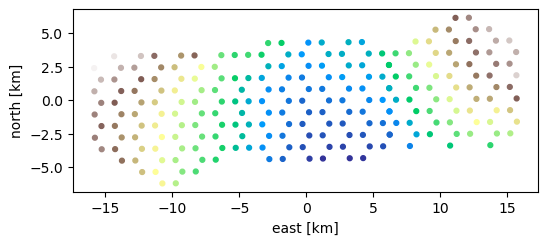
234 units over 12 km north-south and 32 km east-west
The z coordinate falls away from the origin because the frame is tangent
to the Earth at the origin: a unit at the same height 15 km away is about
18 m below the tangent plane. The colors show z, which adds that
curvature to the terrain.
To write these positions into a run of your own, see Writing your own files.
Generating a layout
create_grid_univ in examples/geo/grids.py generates regular layouts
from the size of one hexagonal cell, in meters: rectangular (rect),
hexagonal (hexhex), hexagonal with randomly displaced units
(hexrand) and hexagons with their centers (trihex). It writes
new_antpos.dat and returns the positions. For simulation input, write
the result as name x y z in meters (Producing simulations).
Where next
Coordinates and conventions for the frames and the geomagnetic field at a site.
Data format reference for every field of
TRun.